













































-1.jpg)












.jpg)










Automotive Laptop
Automotive Laptop for Vehicle Diagnostics and Repair
Workshops kill office laptops. Vibration from a running engine bay, grease on the lid, a drop from the hood to concrete — a consumer notebook is not priced or built for any of that.
We build the W14US and W15US rugged laptops for exactly this work: vehicle diagnostics, automotive repair, fleet maintenance and mobile service. Both run Windows 11 Pro on Intel processors, and both carry the physical interfaces diagnostic work actually needs — four USB-A 3.0 ports, two 2.5GbE RJ45 jacks and a DB9 RS232 serial port, no hub required. Dual hot-swappable batteries keep the machine running through a battery change. The enclosure is rated IP65 with MIL-STD-810H drop testing at 1.22 meters.
The laptops work with compatible third-party VCIs, diagnostic adapters and OEM or aftermarket diagnostic software. They are the computer half of the setup — more on what that means below.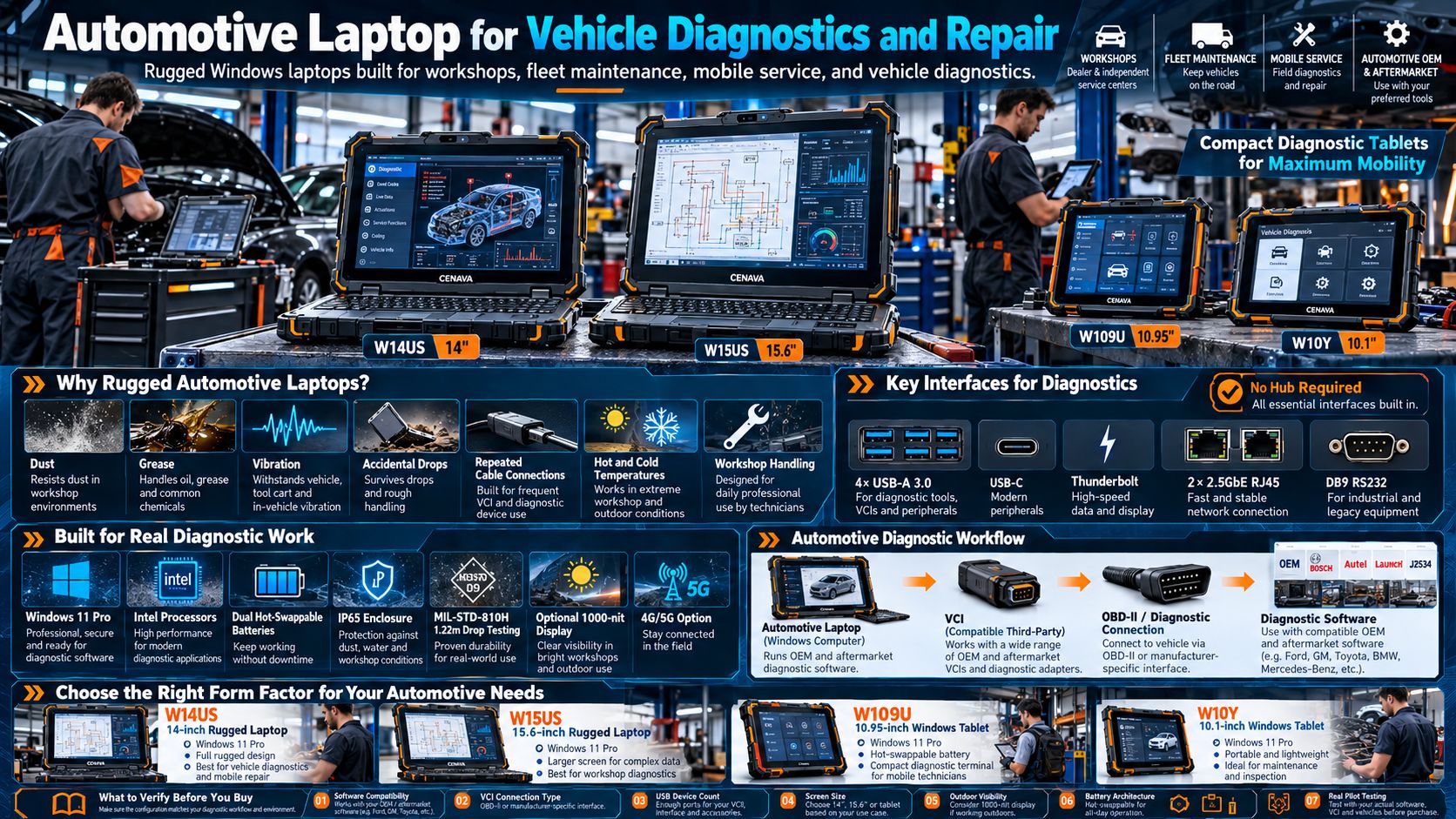
CENAVA Automotive Rugged Laptop Options
| Model | Display | OS | Key Interfaces | Battery | Best Application |
|---|---|---|---|---|---|
| W14US | 14" FHD | Windows 11 Pro | 4× USB-A, USB-C, Thunderbolt, 2× 2.5GbE RJ45, DB9 RS232 | Dual hot-swap | Vehicle diagnostics and mobile repair |
| W15US | 15.6" FHD | Windows 11 Pro | 4× USB-A, USB-C, Thunderbolt, 2× 2.5GbE RJ45, DB9 RS232 | Dual hot-swap | Workshop diagnostics and large-screen service software |
| W109U | 10.95" | Windows 11 | Gigabit RJ45, RS232, HDMI, USB-C, USB-A | 8300mAh hot-swap + backup | Compact vehicle diagnostic terminal |
| W10Y | 10.1" | Windows 11 | Gigabit RJ45, RS232, USB-C, USB-A, HDMI | Built-in / optional higher capacity | Portable vehicle and equipment maintenance |
Four models cover automotive work. W14US and W15US are full-keyboard rugged laptops; W109U and W10Y are compact Windows tablets for technicians who move around the vehicle more than they type. We keep both form factors on this page because most service operations end up mixing the two.
What Is an Automotive Laptop?
An automotive laptop runs the diagnostic, programming and workshop-management software. It does not replace the vehicle communication interface. A professional setup has four parts:
Automotive Laptop → Vehicle Communication Interface (VCI) → OBD-II / Diagnostic Connection → Diagnostic Software
The VCI talks to the laptop over USB, Ethernet, Wi-Fi or Bluetooth, depending on the diagnostic system. That chain is why physical ports matter more on an automotive laptop than on any thin consumer notebook — and why we put four USB-A ports and two Ethernet jacks on the W14US instead of shaving them off.
Why Automotive Technicians Need Rugged Laptops
Automotive workshops are demanding environments for computers.
A laptop may be placed:
- On a repair cart
- Inside a vehicle
- On a workbench
- Near engines
- Beside heavy equipment
- In outdoor service yards
- Inside mobile service vans
The device may be exposed to:
- Dust
- Grease
- Vibration
- Accidental impacts
- Frequent transportation
- Hot and cold temperatures
- Repeated cable connections
A rugged automotive laptop is designed around these working conditions rather than only office use.
Windows Laptop for Automotive Diagnostics
Most professional diagnostic programs are Windows applications, so the service laptop almost always runs Windows. W14US and W15US ship with Windows 11 Pro; Ubuntu is a project option if your stack is Linux-based.
One check we always recommend before you order: verify that your diagnostic software, VCI driver and vehicle interface all support the exact Windows version on the machine. Software-side surprises are the most common failure point in automotive laptop deployments — not the hardware.
Automotive Laptop with Multiple USB Ports
A diagnostic session chains peripherals. Your VCI stays connected while a security key, a measurement device and a flash drive all fight for ports; a consumer laptop with two USB-C ports turns that into a hub-and-adapter mess.
W14US and W15US each provide:
- 4× USB-A 3.0 — VCI, dongles, storage and peripherals at the same time
- USB-C plus a Thunderbolt-class interface
- 2× 2.5GbE RJ45 — modern vehicle diagnostics increasingly runs over Ethernet (DoIP), and a second jack covers the workshop network at the same time
- DB9 RS232 — legacy diagnostic tools and older measurement instruments; RS422/RS485 available as project options
Actual vehicle compatibility depends on the diagnostic interface and the OEM software in use — tell us your VCI brand and we will flag any known issues before you commit.
Actual vehicle compatibility depends on the diagnostic interface, OEM software and communication protocol.
Automotive Laptop with Serial Port
Although modern automotive diagnostics increasingly use USB and Ethernet, serial communication remains relevant for some:
- Legacy diagnostic tools
- Test benches
- Measurement instruments
- Workshop equipment
- Industrial vehicle systems
W14US and W15US provide a built-in DB9 RS232 port, with RS422/RS485 project options listed for applicable configurations.
For technicians maintaining older equipment or mixed automotive and industrial fleets, a native serial interface can reduce dependence on USB adapters.
Best Laptop for Vehicle Diagnostics
Why Choose CENAVA Automotive Rugged Laptops?
Frequently Asked Questions About Automotive Laptops
1. What is the best laptop for automotive diagnostics?
The best laptop is one that supports the required diagnostic software and VCI while providing enough USB, Ethernet, memory and processing performance.
For workshop and field use, rugged construction and hot-swappable batteries can also be valuable.
2. Does an automotive diagnostic laptop need Windows?
Yes, in practice. The majority of professional diagnostic programs are Windows-based, so Windows is the default choice. Verify the OS requirement of your specific software first.
3. Can I use a normal laptop for car diagnostics?
Yes, if the software and diagnostic interface allow it. A rugged laptop adds durability and the physical ports that professional field use demands.
4. Does CENAVA automotive laptop have OBD-II built in?
No. The standard W14US and W15US do not include a universal OBD-II vehicle interface. They connect to third-party diagnostic hardware over USB or Ethernet, depending on the VCI.
5. Why does an automotive laptop need Ethernet?
Ethernet can connect compatible diagnostic interfaces, workshop networks and Ethernet-based vehicle diagnostic systems.
W14US and W15US provide two 2.5GbE RJ45 ports.
6. Why are multiple USB ports important?
Technicians may simultaneously connect a VCI, measurement equipment, security key, storage device and other service peripherals.
Multiple built-in USB ports reduce dependence on external hubs.
7. Is a rugged laptop better than a tablet for mechanics?
A rugged laptop is usually better for long diagnostic sessions, keyboard input and multiple peripherals.
A rugged tablet is more convenient for inspection, vehicle walk-arounds and touchscreen operation.
8. Can automotive laptops be used outdoors?
Yes.
CENAVA W14US and W15US are IP65 rugged laptops with -20°C to 60°C listed operating ranges and optional 1000-nit displays for applicable projects.
9. Can I use an automotive laptop for trucks and heavy equipment?
Yes, provided the required third-party diagnostic interface and software support the target vehicle or machine.
Rugged laptops are particularly useful for fleet, truck and heavy-equipment service because they combine Windows with multiple physical interfaces.
10. Which CENAVA model is suitable for automotive technicians?
Choose W14US for a balance of portability and full laptop functionality.
Choose W15US when a larger display is more important.
Choose W109U when technicians prefer a compact touchscreen device with hot-swappable batteries.
Choose W10Y when maximum tablet mobility and full industrial I/O are priorities.



