













































-1.jpg)












.jpg)









Best Tablet For GPS
Best Tablet for GPS, GNSS and Field Navigation
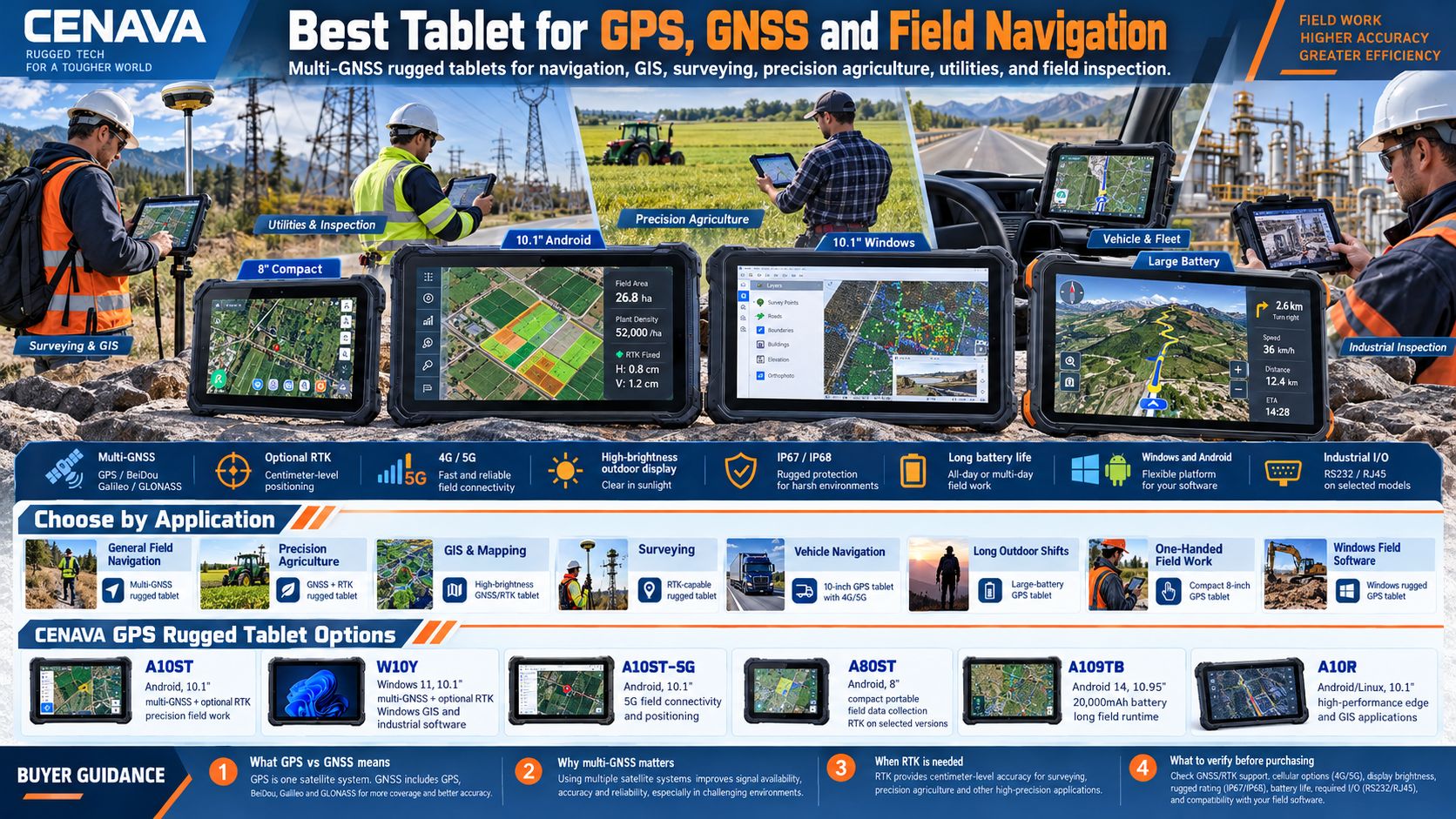
How accurate do you actually need to be? That one question splits the GPS tablet decision in two. For navigation, asset tracking and field inspection, a rugged tablet with multi-GNSS — GPS, BeiDou, Galileo and GLONASS — does the job. For surveying, precision agriculture and GIS work at centimeter level, you need RTK, and that changes the hardware.
We build both kinds: Windows and Android rugged GPS tablets with multi-constellation GNSS and optional RTK, 4G/5G connectivity, 700-nit outdoor displays with 1000-nit options, IP67/IP68 protection, plus batteries up to 20,000mAh. This page walks through which specification matters for which job.
Which Tablet Is Best for GPS?
There is no single tablet that is best for every GPS application.
The right choice depends on the workflow.
| Requirement | Recommended Type |
|---|---|
| General field navigation | Multi-GNSS rugged tablet |
| Precision agriculture | GNSS + RTK rugged tablet |
| GIS data collection | High-brightness GNSS/RTK tablet |
| Surveying | RTK-capable rugged tablet |
| Vehicle navigation | 10-inch GPS tablet with 4G/5G |
| Windows field software | Windows rugged GPS tablet |
| Long outdoor shifts | Large-battery GPS tablet |
| One-handed field work | Compact 8-inch GPS tablet |
| Equipment + location data | GPS tablet with RS232/RJ45 |
| Remote field communication | GPS + 4G/5G rugged tablet |
The important point is to match the positioning system, operating system, display, battery and communication features to the actual application.
CENAVA GPS Rugged Tablet Options
| Model | OS | Screen | Positioning | Key Advantage |
|---|---|---|---|---|
| A10ST | Android | 10.1" | GPS / BeiDou / Galileo / GLONASS + optional RTK | Precision field work and industrial expansion |
| W10Y | Windows 11 | 10.1" | GPS / BeiDou / Galileo / GLONASS + optional RTK | Windows GPS applications and industrial software |
| A10ST-5G | Android | 10.1" | GPS / BeiDou / Galileo / GLONASS + optional RTK | 5G field connectivity and positioning |
| A80ST | Android | 8" | GPS / BeiDou / Galileo / GLONASS; RTK available on selected configurations | Portable field data collection |
| A109TB | Android 14 | 10.95" | GPS / BeiDou / Galileo / GLONASS | 20,000mAh battery and long field runtime |
| A10R | Android / Linux | 10.1" | GPS / Galileo / GLONASS + optional RTK | High-performance edge and GIS applications |
Six models cover the GPS range. Exact positioning modules and RTK configurations vary by model and project — tell us the accuracy target and we will tell you which configuration fits.
What Makes a Good GPS Tablet?
A professional GPS tablet needs more than a GPS receiver. For outdoor and industrial work, seven factors decide whether the tablet actually performs:
- Supported satellite constellations
- Positioning accuracy
- RTK availability
- Screen visibility outdoors
- Battery runtime
- Cellular connectivity
- Environmental protection
A tablet that wins in one area can be wrong in another.
Excellent battery life is ideal for navigation but does nothing for centimeter-level surveying if the RTK configuration is missing — we see buyers make that mistake every quarter.
GPS vs. GNSS: What Is the Difference?
GPS is one system — the United States' Global Positioning System. GNSS is the umbrella term covering several: GPS, BeiDou (China), Galileo (EU) and GLONASS (Russia). A multi-GNSS tablet reads multiple constellations at once instead of relying on GPS alone.
That matters the moment part of the sky disappears — city streets between tall buildings, forests, mountain valleys, vehicle cabins. More constellations means a bigger pool of satellites to lock onto. Every model in the table above reads at least the four constellations above, and multi-GNSS support is the first specification we check when a customer says "GPS tablet."
Best Tablet for High-Accuracy GPS: Choose RTK
Standard GNSS is fine for navigation and most field apps. It is not fine for land surveying, construction layout, pipeline inspection or high-accuracy field mapping — jobs measured in centimeters, not meters.
RTK (Real-Time Kinematic) uses GNSS correction data to sharpen positioning to centimeter class. We configure optional RTK modules on the A10ST and W10Y; the current A10ST specification covers centimeter-class RTK for applicable projects. If your job only needs general navigation, skip RTK and spend the money on battery or brightness instead — that is our honest advice, and it is written into the checklist below.
Best GPS Tablet for Precision Agriculture
Agricultural users often need more than basic turn-by-turn navigation.
A tablet may be used for:
- Field boundary mapping
- Planting
- Soil sampling
- Crop inspection
- Irrigation planning
- Spraying
- Machinery guidance
- Precision agriculture
For these applications, prioritize:
Multi-GNSS
GPS, BeiDou, Galileo and GLONASS improve satellite availability.
RTK
Required when the application needs high-precision coordinates.
Sunlight-readable display
Important for tractors and open fields.
Long battery life
Field workers may spend an entire day away from charging.
4G/5G
Can provide correction data, cloud synchronization and remote communication.
A10ST and A10ST-5G:A10ST is the Android workhorse: four-constellation GNSS with optional RTK, a 10,000mAh battery and a 700-nit display, with higher-capacity and higher-brightness options on request. The A10ST-5G variant adds global 5G SA/NSA plus Wi-Fi 6, keeps the same 10,000mAh pack — rated at 10 hours minimum under our test conditions — and offers optional centimeter-level RTK. Pick the 5G version when the tablet has to sync maps, work orders or RTK correction data in real time.
W10Y:Some field software only runs on Windows — legacy GIS packages, engineering applications, survey tools and diagnostic programs. An Android tablet will not help there, no matter how good its GPS is. W10Y pairs Windows 11 with four-constellation GNSS and optional RTK, on a 10.1-inch 1920×1200 700-nit panel built for outdoor reading. Gigabit RJ45 and RS232 come standard, plus USB and HDMI for peripherals. When we spec a Windows GPS build, this is the model we start from.
A109TB:Continuous GNSS plus cellular plus a bright screen drains a battery faster than most spec sheets admit. For teams whose shift outruns a normal charge, the A109TB carries a 20,000mAh pack with a stated 16–18 hour runtime under its test conditions… We position it for long navigation and field-runtime jobs — not for projects whose primary requirement is RTK.
Big screens help maps; they also add weight. If the technician walks all day, the 8-inch A80ST disappears into one hand and still offers RTK on selected configurations. For vehicles, go the other way: a 10-inch tablet gives real map area on a dashboard mount without crowding the cab. W10Y and A10ST both expose POGO pins for dock ecosystems, and we quote vehicle chargers and docks per project.
Best Compact GPS Tablet
Large screens are useful for maps, but they also increase the size and weight of the device.
For technicians who walk long distances or carry a tablet continuously, an 8-inch model can be more practical.
The A80ST is an 8-inch Android rugged tablet with:
- GPS
- BeiDou
- Galileo
- GLONASS
- 4G LTE
- 10,000mAh battery
- IP68 protection
Selected A80ST configurations also support RTK.
This makes the 8-inch format particularly useful for field inspection, asset management and portable GIS data collection.
GPS Tablet for Vehicle Navigation
A professional vehicle GPS tablet needs different features from a handheld GPS tablet.
Important requirements include:
- Large display
- Strong GNSS reception
- Vehicle mounting
- Continuous charging
- 4G/5G
- Wide operating temperature range
- Vibration resistance
Vehicle-mounted GPS tablets can be used in:
- Trucks
- Forklifts
- Agricultural machinery
- Service vehicles
- Mining equipment
- Delivery fleets
- Construction machinery
A 10-inch rugged tablet is often well suited to vehicle installation because it provides more map area while remaining compact enough for a dashboard or cab.
GPS Tablet for Construction
Surveying and Construction:Surveying has much stricter positioning requirements than ordinary navigation. A consumer tablet can display maps, but it should never be treated as a survey instrument. Accuracy comes from the whole chain — receiver, antenna, correction source, satellite conditions and software — not from the word "GPS" in a spec sheet. Construction teams use GPS tablets for site navigation and asset location, plus survey data and progress documentation — in dust and rain, often in direct sunlight. For layout work, add RTK to that list. We tell every survey customer the same thing: define the accuracy target first, then we configure the tablet around it.
Utilities, Forestry and Fleet:Utility crews locate poles, meters, fiber routes and water infrastructure, then file work orders against those coordinates; RTK enters the picture when the infrastructure database needs highly accurate positions. Forestry teams work under canopy that blocks part of the sky — multi-GNSS earns its keep there, and we usually spec the 8-inch A80ST to save weight on long walks. Fleet and logistics operators combine navigation with driver apps and dispatch, plus proof of delivery, pushing location and status back over 4G/5G where the application supports it.
4G/5G connectivity allows the device to send location and operational information to remote systems where the application supports that functionality.
Built-In GPS vs. External GPS Receiver
A tablet can obtain location information in two main ways.
No. GPS satellite positioning itself does not require a cellular subscription — the receiver works from satellite signals alone. You only need 4G or 5G for things like live fleet data, work orders, RTK correction streams and cloud sync.
Yes. Built-in GNSS does not depend on Wi-Fi, and offline maps or field software can be stored locally where the app supports offline use.
Yes. Positioning itself works offline; an Internet connection is only needed for online maps and cloud applications, or for certain correction services. For remote field teams, that distinction matters — plan the data workflow around it, and ask us if you are unsure.
Sunlight-Readable Display for GPS Navigation
GPS tablets are often used outdoors.
A bright display makes maps and navigation information easier to read.
Outdoor GPS work is a display problem as much as a positioning problem. Our rugged platforms run 700-nit high-brightness panels on selected models, with 1000-nit options on certain devices — the A109TB, for example, is 700 nits standard with a 1000-nit configurable option. Judge brightness together with battery draw, not in isolation.
Glove touch and wet-hand operation are available on certain models and project configurations — field workers should not have to bare their hands every time the map needs a nudge. And because field tablets live in dust, rain and the occasional drop, IP68-rated models with MIL-STD-810H-tested construction cover the environments that GPS alone cannot survive.
GPS performance alone should therefore not be the only factor when selecting a field tablet.
GPS Accuracy: Do Not Judge by “GPS” Alone
Two tablets can both list “GPS” while serving very different positioning requirements.
When comparing GPS tablets, ask:
Which GNSS systems are supported?
Look for GPS, BeiDou, Galileo and GLONASS.
Is RTK available?
This matters for high-precision applications.
What accuracy does the project require?
Navigation and surveying do not require the same accuracy.
Does the application work offline?
Important for remote locations.
Is cellular connectivity required?
Cloud applications and RTK correction services may require mobile data.
Is the screen readable outside?
A technically accurate position is not useful if the operator cannot read the map.
How long will GPS run?
Continuous GNSS and cellular operation affect battery life.
How to Choose the Best Tablet for GPS
Which CENAVA GPS Tablet Fits Which Application?
Why Choose CENAVA Rugged GPS Tablets?
Frequently Asked Questions About GPS Tablets
1. What is the best tablet for GPS?
The best GPS tablet depends on the application.
For navigation, choose a multi-GNSS tablet.
For surveying or precision agriculture, choose an RTK-capable rugged tablet.
For long field shifts, prioritize battery capacity.
For professional Windows software, select a Windows GPS rugged tablet.
2. Which tablet has the most accurate GPS?
Not a model-name question. Look for RTK support and evaluate receiver, antenna, correction service and field conditions together.
3. Is GNSS better than GPS?
GNSS is the broader positioning system.
A multi-GNSS receiver can use multiple satellite constellations, including GPS, BeiDou, Galileo and GLONASS.
This generally provides access to more satellites than GPS-only positioning.
4. What is an RTK tablet?
An RTK tablet combines mobile computing with a GNSS positioning system capable of using Real-Time Kinematic correction data.
RTK is used when much higher positioning accuracy is required than normal navigation.
5. Can a tablet GPS work without Internet?
Yes.
Satellite GPS/GNSS positioning itself does not require Internet access.
Online maps, cloud synchronization and certain correction services may require Internet connectivity.
6. Can GPS work without a SIM card?
Yes.
A SIM card is not required for satellite positioning.
A SIM is required when the tablet needs cellular data through 4G or 5G.
7. Is Android or Windows better for GPS?
Neither is universally better. Android suits mobile, touch-first field apps; Windows is the choice when the GIS or engineering application only runs on Windows.
8. Is an 8-inch or 10-inch tablet better for GPS?
An 8-inch tablet is easier to carry.
A 10-inch tablet provides more space for maps, GIS layers and vehicle navigation.
The correct choice depends on whether portability or map visibility is more important.
9. Does CENAVA offer GPS tablets with RTK?
Yes.
Selected CENAVA rugged tablet platforms support optional RTK positioning for applications requiring higher accuracy.
10. What should I check before buying a GPS tablet?
The complete field workflow: accuracy target, OS, constellations, RTK, screen, battery, connectivity, I/O. Never buy a tablet just because "GPS" appears in the specification — send us the workflow and we will check it against the range.



