













































-1.jpg)












.jpg)









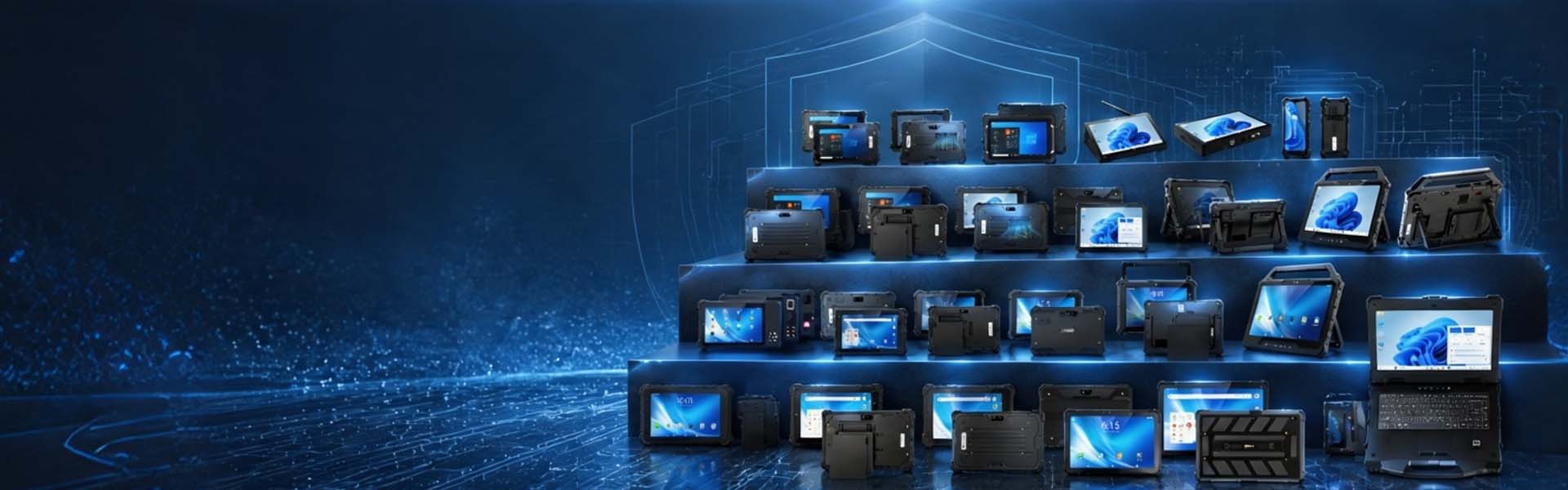
Ethernet Rugged Tablets
Ethernet Rugged Tablets with Built-In RJ45
Wi-Fi drops. Cables do not.
That is the whole argument for an Ethernet rugged tablet: when the factory Wi-Fi is patchy, when security policy demands a physical connection, when a PLC only speaks wired — the tablet needs its own RJ45 port. We build them with the port inside the chassis, not hanging off a USB adapter. Depending on the model you get 100M or Gigabit Ethernet alongside RS232, USB, HDMI and POGO, on Windows or Android, in IP65 to IP68 enclosures.
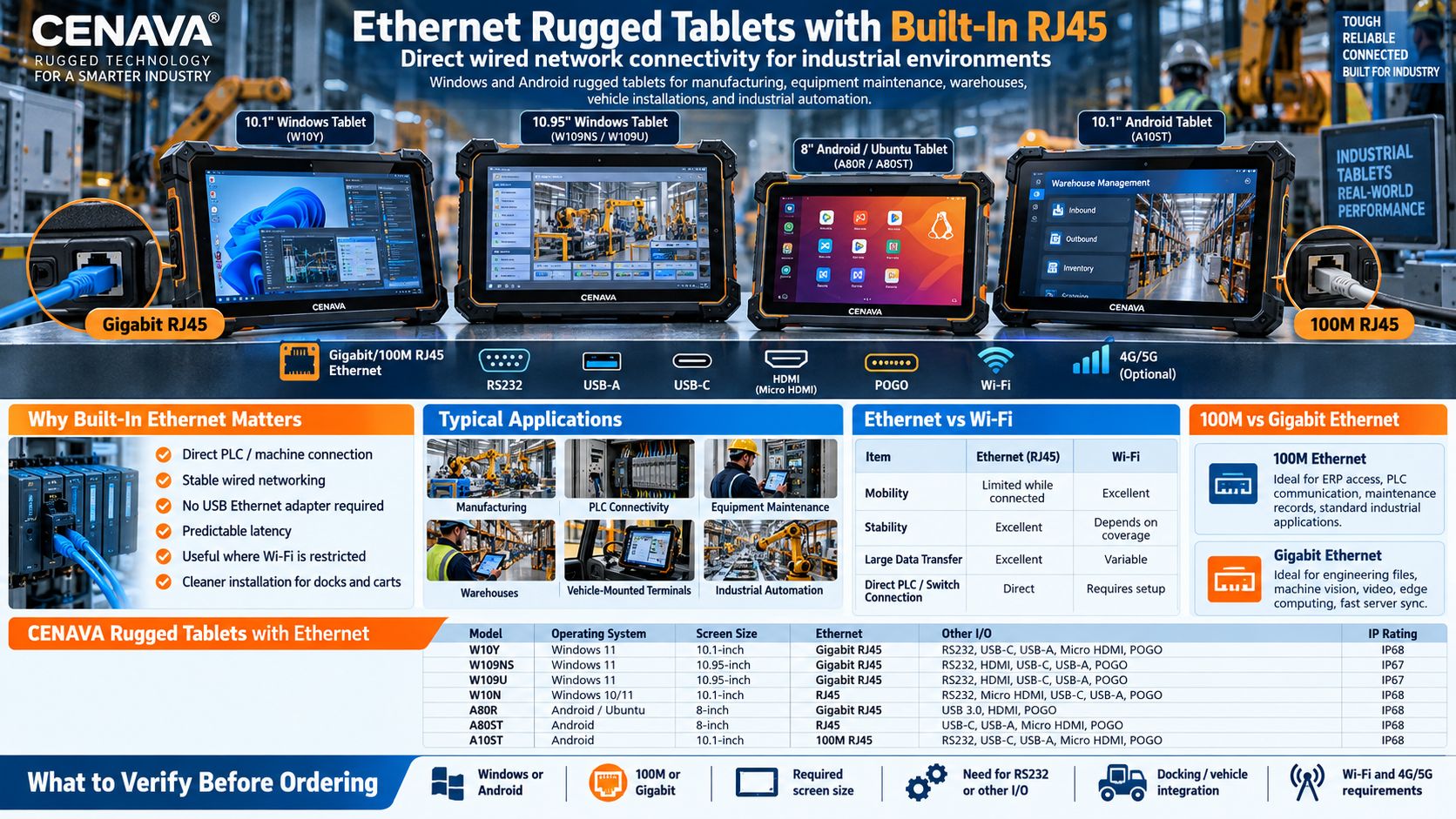
CENAVA Rugged Tablets with Ethernet
| Model | OS | Screen | Ethernet | Other Industrial Interfaces | Protection |
|---|---|---|---|---|---|
| W10Y | Windows 11 | 10.1" | Gigabit RJ45 | RS232, USB-C, USB-A, Micro HDMI, POGO | IP68 |
| W109NS | Windows 11 | 10.95" | Gigabit RJ45 | RS232, HDMI, USB-C, USB-A, POGO | IP67 |
| W109U | Windows 11 | 10.95" | Gigabit RJ45 | RS232, HDMI, USB-C, USB-A, POGO | IP67 |
| W10N | Windows 10/11 | 10.1" | RJ45 | RS232, Micro HDMI, USB-C, USB-A, POGO | IP68 |
| A80R | Android / Ubuntu | 8" | Gigabit RJ45 | USB 3.0, HDMI, POGO | IP68 |
| A80ST | Android | 8" | RJ45 | USB-C, USB-A, Micro HDMI, POGO | IP68 |
| A10ST | Android | 10.1" | 100M RJ45 | RS232, USB-C, USB-A, Micro HDMI, POGO | IP68 |
Ethernet speed, operating system and interface configuration vary by model. Confirm the exact configuration required for your project before ordering.
Why Choose a Rugged Tablet with an Ethernet Port?
Reliable Wired Network Connection
Wi-Fi is convenient for mobile work, but some environments demand a wire: inconsistent coverage, restricted wireless policies, latency that must stay predictable, big files, equipment that only speaks Ethernet, security rules requiring physical connections. A tablet with RJ45 connects straight to the factory network, the PLC or the local server without depending on wireless at all.
Consumer tablets get wired networking through a USB-C adapter. That is acceptable in an office and annoying on a factory floor: the adapter occupies a USB port, adds a cable, and introduces one more connector that can loosen or break on the road. We integrate the RJ45 port into the chassis itself. One cable in, done — a cleaner installation on maintenance carts, production lines and vehicle mounts.
Gigabit Ethernet Rugged Tablets
High-resolution images and inspection data can generate large files that need to be transferred quickly between the tablet and local systems.
Video Monitoring
Industrial cameras and monitoring systems may require higher network throughput than ordinary data-entry applications.
Engineering Data
Technicians working with CAD files, equipment logs or large diagnostic datasets can benefit from faster wired connections.
Edge Computing
Rugged tablets used for local computing or AI applications may need to exchange significant amounts of data with servers, cameras or industrial equipment.
Local Server Access
Factories with MES, SCADA or database servers on the local network can use Ethernet to maintain a stable connection.
Ethernet Rugged Tablets for PLC Connectivity
PLCs remain central to many industrial automation systems.
A rugged tablet with RJ45 Ethernet can connect to compatible PLC networks for equipment configuration, monitoring, diagnostics and maintenance.
Depending on the software and industrial protocol in use, Windows rugged tablets can run engineering applications or HMI software while communicating with automation equipment over Ethernet.
Typical applications include:
- PLC programming
- Machine configuration
- Equipment diagnostics
- Production monitoring
- Maintenance records
- HMI applications
- Industrial data collection
Models that combine Ethernet and RS232 provide additional flexibility when a facility contains both newer Ethernet-based equipment and older serial devices.
Ethernet + RS232 for Industrial Equipment
Industrial sites often contain equipment from different generations.
Modern machines may communicate through Ethernet, while older controllers, meters and diagnostic equipment still use RS232 serial communication.
For this reason, selected CENAVA rugged tablets integrate both RJ45 and RS232.
One device can therefore connect to:
Ethernet equipment
- PLCs
- Industrial switches
- Local servers
- Network cameras
- Ethernet-enabled machines
Serial equipment
- Legacy controllers
- Measurement instruments
- Diagnostic systems
- Sensors
- Industrial terminals
This makes a full-I/O rugged tablet useful for equipment maintenance teams that work with different machines throughout a facility.
Windows Rugged Tablets with Ethernet
Windows models run the engineering software — PLC tools, HMI applications, SCADA clients and diagnostic suites — while talking to the equipment over Ethernet or RS232. Android models give warehouse terminals and production-line stations, plus custom industrial apps, a lighter platform with the same wired access. We build both, so the choice follows your software, not our inventory.
Android provides a lightweight mobile platform, while RJ45 gives the device direct access to local industrial infrastructure.
For projects requiring higher network throughput, selected Android configurations are also available with Gigabit Ethernet.
Ethernet Rugged Tablets for Manufacturing
Manufacturing is one of the strongest use cases for a rugged tablet with RJ45.
Factories often use a combination of Wi-Fi, Ethernet, PLC networks and local servers.
Manufacturing is the strongest case: crews walk the floor on Wi-Fi, then plug straight into a machine over RJ45 to run diagnostics or configuration, record the maintenance entry and upload results to the factory network — one device replacing laptop and fixed terminal. That is the workflow our factory customers run daily.
Warehouses use Ethernet for fixed stations — receiving, packing, inventory and dispatch desks — then undock and continue on Wi-Fi or 4G/5G. Vehicle-mounted builds connect to onboard equipment and cameras, or vehicle controllers, with POGO docks and vehicle power completing the installation.
Depending on the installation, Ethernet can connect the tablet to onboard equipment, cameras, controllers or local network systems.
POGO docking interfaces and vehicle power solutions can provide additional integration options.
RJ45 Ethernet vs. Wi-Fi
Ethernet and Wi-Fi are not competing technologies; the best industrial tablet supports both. Stay mobile on wireless, plug in when the connection has to be wired. The honest comparison:
| Feature | Ethernet | Wi-Fi |
|---|---|---|
| Mobility | Limited while connected | Excellent |
| Connection Stability | Excellent | Depends on coverage |
| Latency | Consistent | Can vary |
| Installation | Cable required | Wireless |
| Local Equipment Connection | Excellent | Depends on equipment |
| PLC / Switch Connection | Direct | May require network setup |
| Large Data Transfer | Excellent with Gigabit | Depends on Wi-Fi standard |
| Field Mobility | Limited | Excellent |
We configure every Ethernet model with Wi-Fi as standard — the cable is there for when wireless fails, not instead of it.
100Mbps vs. Gigabit Ethernet Rugged Tablets
Not every industrial application requires Gigabit Ethernet.
100Mbps Ethernet
100M Ethernet is usually sufficient for:
- ERP access
- Barcode data
- Equipment parameters
- PLC communication
- Maintenance records
- Standard industrial applications
Gigabit Ethernet
Gigabit Ethernet is more appropriate for:
- Large engineering files
- High-resolution images
- Video streams
- Machine vision
- Edge computing
- High-volume data transfer
- Fast server synchronization
When choosing a rugged tablet, network speed should be matched to the actual application rather than selecting Gigabit Ethernet only because it has a higher specification.
Industrial Interfaces Beyond Ethernet
Ethernet is one port among several. The full set we integrate: RS232 for legacy equipment; USB-A for keyboards, scanners and flash drives; USB-C for data and OTG, plus charging on certain models; HDMI for an external display; POGO pins for docks and accessories; Wi-Fi and Bluetooth standard, optional 4G/5G for life away from the cable. One device — portable field unit and fixed workstation both.
Rugged Protection for Industrial Networks
These ports live in tough enclosures: depending on model, we build them at IP65, IP67 or IP68, for dust, water, drops, vibration and repeated cable insertion. The point of an Ethernet rugged tablet is to sit where the machines are — not in a clean office.
This combination of physical durability and industrial connectivity allows Ethernet rugged tablets to be deployed directly where machines and operators work.
Why Choose CENAVA Ethernet Rugged Tablets?
Frequently Asked Questions About Ethernet Rugged Tablets
1. What is an Ethernet rugged tablet?
An Ethernet rugged tablet is an industrial tablet with a physical Ethernet network interface, usually an RJ45 port.
It combines rugged protection with direct wired network connectivity for factories, warehouses, equipment maintenance and industrial automation.
2. Do rugged tablets have Ethernet ports?
Some do.
Consumer tablets rarely include full-size RJ45 ports, but selected industrial rugged tablets integrate Ethernet directly into the chassis.
CENAVA offers both Windows and Android rugged tablets with built-in Ethernet.
3. Does CENAVA offer tablets with Gigabit Ethernet?
Yes.
Selected CENAVA models provide Gigabit RJ45 Ethernet for applications requiring higher network throughput.
Other models provide 100Mbps Ethernet for standard industrial networking.
4. Can an Ethernet rugged tablet connect directly to a PLC?
In many applications, yes — RJ45 establishes the physical link. Actual communication depends on the PLC and the protocol in use; tell us the PLC brand and we will check compatibility when we quote.
5. Is Ethernet better than Wi-Fi for industrial tablets?
Neither is always better. Ethernet gives stable wired connectivity; Wi-Fi gives mobility. Most industrial users benefit from a tablet that supports both — all of ours do.
6. Can I use Ethernet and 4G/5G on the same rugged tablet?
Selected models support both wired Ethernet and cellular connectivity.
This allows the device to use the factory network through RJ45 and switch to mobile connectivity when working outside the wired network.
7. Do CENAVA Android rugged tablets support Ethernet?
Yes.
Selected CENAVA Android rugged tablets include built-in RJ45 Ethernet, including models designed for warehouse, manufacturing and industrial equipment applications.
8. Do CENAVA Windows rugged tablets include RJ45?
Selected Windows models include built-in RJ45 ports together with interfaces such as RS232, USB, HDMI and POGO.
Always check the individual model configuration before ordering.
9. What is the difference between 100M and Gigabit Ethernet?
100M Ethernet supports network speeds up to 100Mbps, while Gigabit Ethernet supports up to 1Gbps under appropriate network conditions.
100M is sufficient for many PLC, ERP and industrial data applications.
Gigabit Ethernet is preferable for high-volume data transfer, video, high-resolution images and edge computing.
10. How do I choose an Ethernet rugged tablet?
Four decisions: OS first (Windows for engineering software, Android for lighter apps); speed second (100M for PLC and ERP traffic, Gigabit for vision and video); interfaces third (count the RS232, USB and HDMI devices that must stay connected); protection and docking last (IP rating, vehicle mounts, docks). Send us the list and we will return a model and a quote.



