













































-1.jpg)












.jpg)









Industrial Notebook
Industrial Notebook PCs for Manufacturing and Field Work
Office laptops are built for offices. These are built for the floor.
We build industrial notebooks for manufacturing, maintenance, engineering and field work — machines that carry a full keyboard and laptop-class computing between machines and workshops, vehicles and job sites. Windows 11 Pro or Linux, IP65 sealing, MIL-STD-810H construction, physical Ethernet, native RS232, multiple USB ports, hot-swappable batteries.
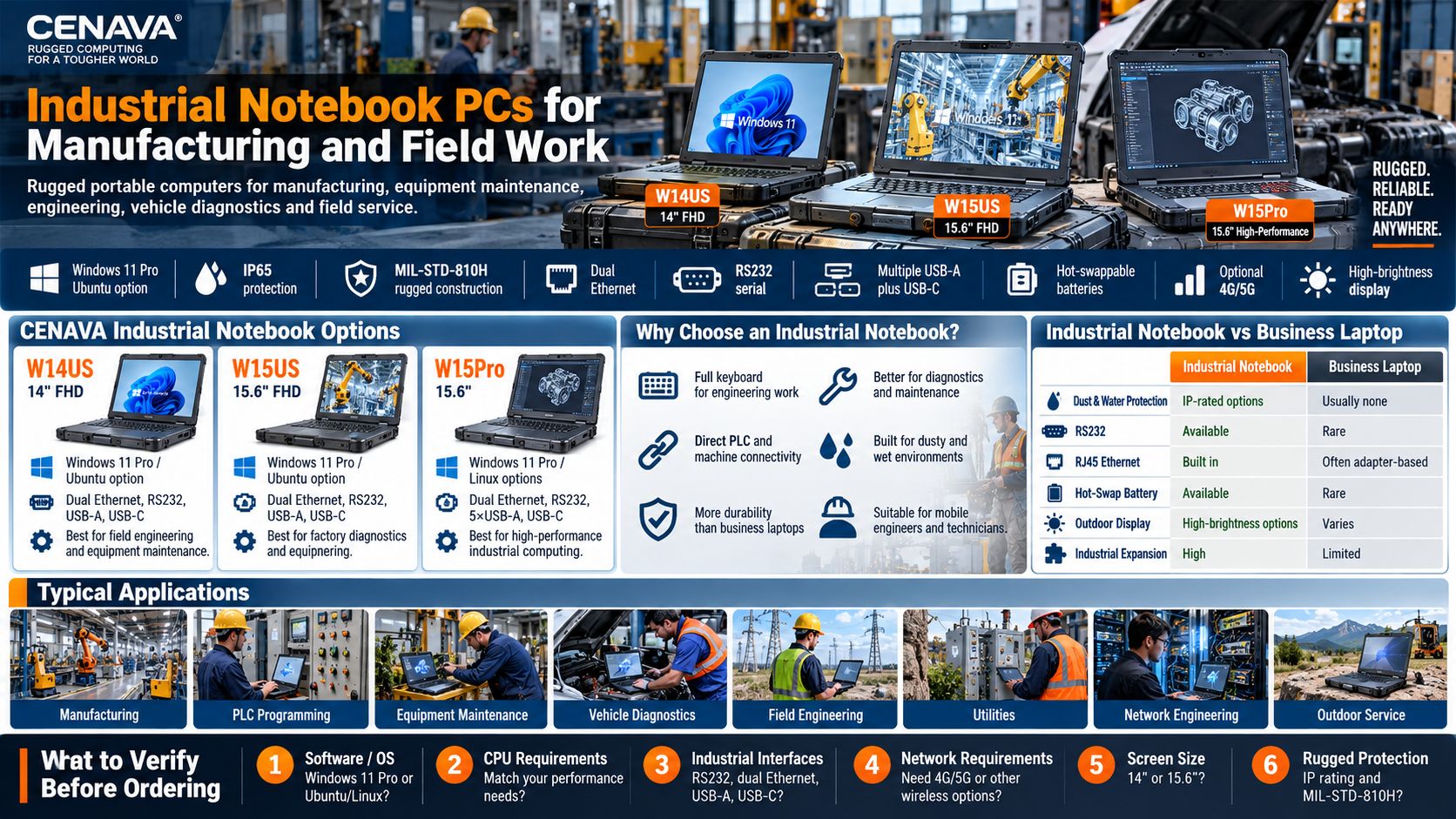
CENAVA Industrial Notebook Options
| Model | Display | Operating System | Industrial Connectivity | Key Application |
|---|---|---|---|---|
| W14US | 14" FHD | Windows 11 Pro / Ubuntu option | Dual Ethernet, RS232, USB-A, USB-C | Field engineering and equipment maintenance |
| W15US | 15.6" FHD | Windows 11 Pro / Ubuntu option | Dual Ethernet, RS232, USB-A, USB-C | Factory diagnostics and engineering |
| W15Pro | 15.6" | Windows 11 Pro / Linux options | Dual Ethernet, RS232, 5×USB-A, USB-C | High-performance industrial computing |
Different processor, memory, storage, display and communication configurations are available according to the model and project requirements.
What Is an Industrial Notebook?
An industrial notebook is a portable PC for environments harsher than an office. It keeps the notebook form — display, keyboard, trackpad, processor, storage — and adds the industrial layer: reinforced enclosure, dust and water protection, drop and vibration resistance, wide-temperature operation, native RS232 and RJ45, multiple USB ports, hot-swappable batteries, optional cellular, expandable storage, TPM security.
The point: desktop-class capability that does not need a desk. We build them for engineers who work beside the machine, not beside the window.
Industrial Notebook vs. Business Laptop
A business notebook serves offices, meetings and travel. For pure office work, it is enough — we will not argue otherwise. On a manufacturing floor or a maintenance round, the industrial notebook earns its price through durability and connectivity:
| Feature | Industrial Notebook | Business Laptop |
|---|---|---|
| Dust & Water Protection | IP-rated options | Usually none |
| Drop Resistance | Rugged construction | Limited |
| RS232 | Available | Rare |
| RJ45 Ethernet | Built in on selected models | Increasingly adapter-based |
| Multiple USB-A Ports | Multiple ports available | Often fewer |
| Hot-Swap Battery | Available | Rare |
| Outdoor Display | High-brightness options | Varies |
| Wide Temperature Operation | Designed for industrial environments | Limited |
| Cellular Connectivity | Optional | Limited |
| Industrial Expansion | High | Limited |
Windows Industrial Notebooks
Windows 11 Pro is the default because engineering software lives there: PLC programming tools, SCADA clients, MES applications, diagnostic software. Existing Windows infrastructure makes deployment simpler than introducing a new platform.
Linux is the project option — Ubuntu configurations for network engineering, edge computing, embedded development and custom control systems. One caution we give every Linux buyer: verify driver compatibility for the exact hardware configuration before volume rollout. We run that check with you.
Industrial Notebook with RS232
RS232 remains important in industrial maintenance.
Factories may still operate equipment such as:
- PLCs
- CNC machines
- Controllers
- Measurement instruments
- Test equipment
- Industrial sensors
- Legacy production machinery
A built-in DB9 RS232 interface allows technicians to connect to compatible equipment without depending on a USB-to-serial adapter.
Selected CENAVA industrial notebooks provide RS232 as standard, with RS422/RS485 options available on applicable project configurations.
For facilities operating both old and new industrial equipment, native serial connectivity can significantly simplify maintenance workflows.
Industrial Notebook with Ethernet
Industrial sites still run on serial and Ethernet. A built-in DB9 RS232 connects to older PLCs, CNC machines, controllers and instruments without a USB adapter dangling off the port; RS422/RS485 are project options. Dual RJ45 ports at up to 2.5GbE let one port talk to the machine while the second stays on the factory network. Multiple native USB-A ports plus USB-C keep diagnostic adapters and security dongles connected, plus measurement gear and storage — that is why we still put up to five USB-A ports on these machines instead of shipping you a hub.
Hot-Swappable Battery Industrial Notebooks
Industrial work does not stop when the battery runs low — diagnostic software and equipment monitoring should not be interrupted mid-session. Dual smart batteries let one pack carry the system while the other is swapped. Multi-shift teams, mobile engineers and vehicle service crews benefit most; we size the spare-battery routine with you when we quote.
Industrial Notebooks for Manufacturing
Manufacturing environments are one of the main applications for rugged industrial notebooks.
Engineers can use them for:
PLC Programming
Connect directly to industrial controllers and configure automation systems.
Machine Commissioning
Run configuration software beside newly installed production equipment.
Equipment Diagnostics
Read machine status, troubleshoot faults and change parameters.
Production Network Maintenance
Use Ethernet to access switches, servers and compatible industrial devices.
MES and Production Systems
Access production information while moving between different areas of the factory.
Unlike a fixed industrial panel PC, a notebook can move with the engineer from machine to machine.
Industrial Notebook vs. Rugged Tablet
Keyboard-intensive engineering and diagnostics: notebook. Handheld inspection, scanning and touch-first workflows: tablet. Many teams run both — we build both, so this advice costs us nothing.
| Feature | Industrial Notebook | Rugged Tablet |
|---|---|---|
| Physical Keyboard | Integrated | Optional |
| Touch Operation | Optional | Primary |
| Detailed Typing | Excellent | Moderate |
| Handheld Inspection | Limited | Excellent |
| Multiple Ports | Excellent | Good |
| Desktop Software | Excellent | Excellent on Windows models |
| One-Hand Operation | No | Available |
| Engineering Work | Excellent | Good |
| Vehicle Mounting | Larger | More compact |
| Barcode/RFID Integration | Less common | More common |
14-Inch vs. 15.6-Inch Industrial Notebook
High-Brightness Industrial Notebook Displays
Engineers may need to use a notebook outdoors or in bright industrial environments.
Outdoor work stacks three options onto the base machine. Brightness: 550-nit panels standard, higher-brightness configurations on request — judge it together with battery, since the backlight is the hungriest component. Cellular: optional 4G/5G for cloud systems, remote support and field databases beyond Wi-Fi. Security: our platforms carry TPM 2.0 standard; encryption and VPN, endpoint management and user permissions remain your IT side's design — hardware is the foundation, not the whole building.
IP65 Industrial Notebooks
Selected CENAVA industrial notebooks use IP65-rated enclosures.
These notebooks carry IP65 — dust-tight and protected against water jets under defined test conditions. Not immersion; keep the port covers closed. MIL-STD-810H testing covers the drops, vibration, transportation and temperature stress of repeated site moves. Read the certification narrowly: the method and conditions matter more than the label — ask us which methods were run on your model and we will send the details.
How to Choose an Industrial Notebook
Why Choose CENAVA Industrial Notebooks?
Frequently Asked Questions About Industrial Notebooks
1. What is an industrial notebook?
An industrial notebook is a portable computer designed for professional applications in manufacturing, engineering and field environments.
It usually provides greater physical protection and more industrial interfaces than a normal business notebook.
2. What is the difference between an industrial notebook and a rugged laptop?
The terms overlap. "Industrial notebook" emphasizes industrial applications and connectivity; "rugged laptop" emphasizes physical durability and environmental protection. Most of ours are both.
3. Does CENAVA offer Windows industrial notebooks?
Yes.
Selected CENAVA rugged laptops run Windows 11 Pro for industrial engineering, diagnostics and maintenance applications.
4. Can an industrial notebook run Linux?
Yes.
Selected CENAVA industrial notebook platforms support Ubuntu or other Linux project configurations.
Driver compatibility should be verified for the complete hardware configuration.
5. Do industrial notebooks have RS232?
Selected CENAVA rugged laptops integrate a native DB9 RS232 serial interface, with RS422/RS485 options available on applicable project builds.
6. Do industrial notebooks have Ethernet?
Yes.
Selected CENAVA models provide dual RJ45 Ethernet ports with up to 2.5GbE connectivity.
7. Why does an industrial laptop need multiple USB ports?
Technicians may connect diagnostic adapters, storage devices, measurement equipment, security dongles and other peripherals simultaneously.
Multiple native USB ports reduce the need for hubs.
8. Can an industrial notebook be used outdoors?
Yes.
Select a model with appropriate IP protection, operating-temperature range and screen brightness for the environment.
Higher-brightness displays are available on selected CENAVA configurations.
9. Is an industrial notebook better than a rugged tablet?
It depends on the workflow.
Choose a notebook for keyboard-intensive engineering and diagnostics.
Choose a tablet for handheld inspection, scanning and mobile touchscreen applications.
10. How do I choose an industrial notebook?
Start with OS, software and interfaces; then processor and display size, networking, battery, storage, protection. Test the complete configuration before volume deployment — or let us run the pilot with you.



