













































-1.jpg)












.jpg)










Warehouse Tablets
Rugged Warehouse Tablets for Inventory, Picking & Shipping
A warehouse tablet puts the WMS where the goods are — receiving doors, aisles, picking carts and the dispatch bench. We build the CENAVA warehouse range on Windows or Android, so your team checks stock and captures identifiers at the point of work.
Choose an 8-inch device for mobile work or a 10.1-inch screen for detailed order information. Configure scanning, carrying accessories and charging around the operator’s route, whether the tablet travels on foot, stays on a cart or uses an approved forklift installation.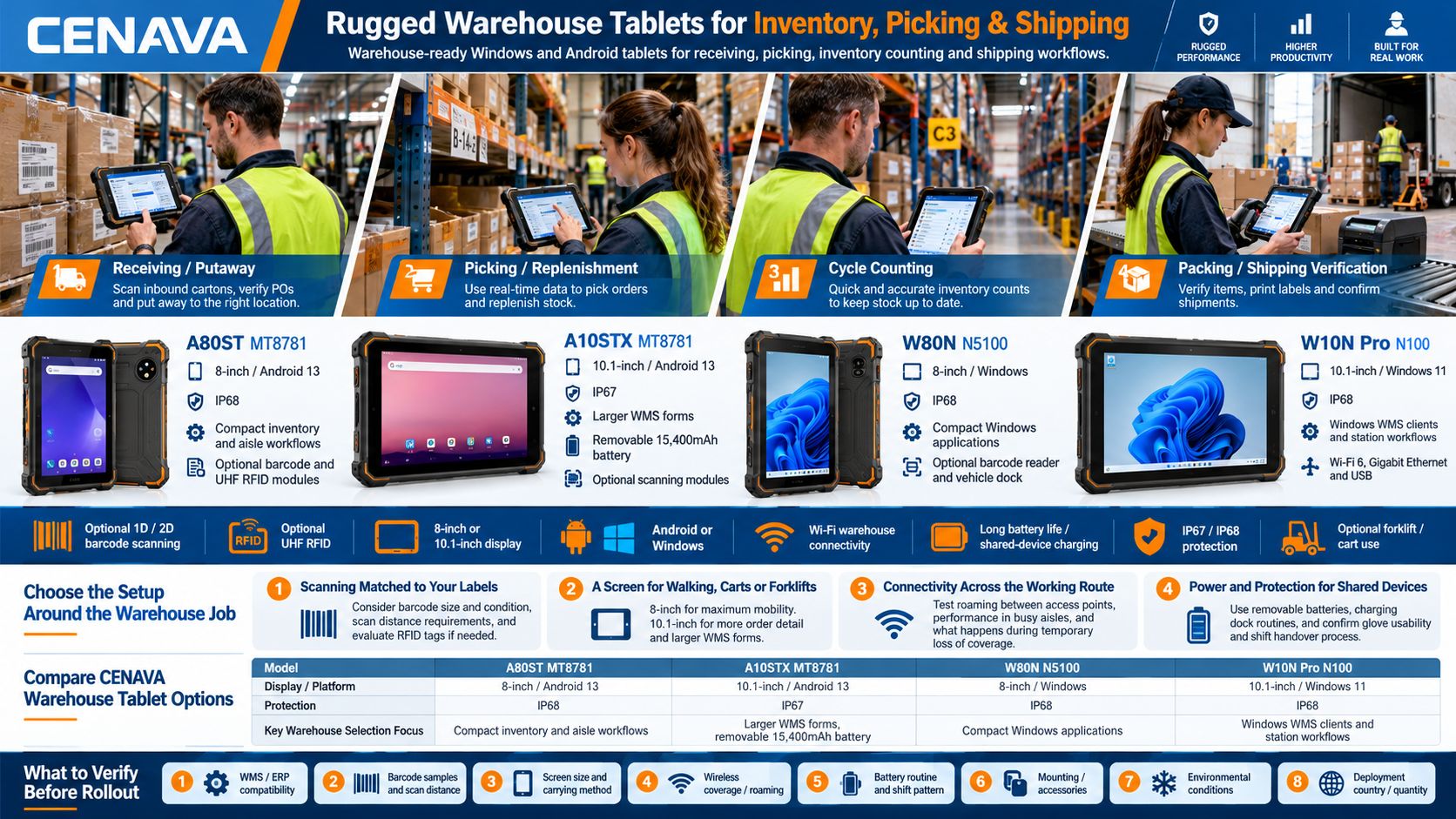
Follow Goods from Receiving to Dispatch
Receiving and Putaway
Review incoming orders, scan pallet or carton labels and record received quantities through the WMS. Photograph damaged packaging and attach discrepancies to the receiving record when the application supports it.
For putaway, show the assigned storage location on screen and scan the destination label to close the loop. The WMS owns the allocation rules and updates the inventory record.
Picking and Replenishment
Show the pick location, item, quantity and relevant product image on the same screen. A supported scanner can capture the location and product identifiers for validation by the picking application.
Make the difference between a piece, inner pack and full carton clear in the workflow. For replenishment, record both the source and destination so the system can track the stock movement.
Cycle Counting and Inventory Checks
Bring count instructions to the rack and enter results beside the stock. Where supported, a blind-count workflow lets the operator record quantities before viewing the expected balance.
Capture lot or serial information when required and send discrepancies for review. Barcode or RFID hardware collects identifiers; count rules, adjustments and approvals remain part of the inventory application.
Packing and Shipping Verification
Check picked items against the shipment, review packing instructions and record carton or pallet identifiers. Connect supported scanners, scales or label printers through the interfaces required by the application.
Before dispatch, use the software to verify the shipment and staging location. Test the complete sequence, including label printing and the handling of short picks or damaged goods.
Choose the Setup Around the Warehouse Job
Scanning Matched to Your Labels
We fit optional 1D/2D barcode and UHF RFID modules on the models in the table below. Choose the reader with real label samples — barcode size and scanning distance decide, not the datasheet.
A carton label at arm’s length and a location label high on a rack require different evaluations. For RFID, specify the tags, read area and surrounding materials, then test which tags the application should accept.
A Screen for Walking, Carts or Forklifts
An 8-inch tablet is a compact option for inventory checks and movement between aisles. A 10.1-inch display gives order lines, product photographs and exception forms more space.
Try the device with the strap or mount you will actually use. For a forklift installation, specify the dock, power supply, scanner position and cable routing together. The W80N takes an optional vehicle dock; whether the installation works still depends on the vehicle and the accessories you pick.
Connectivity Across the Working Route
Evaluate WMS response while moving through receiving doors, loaded aisles and dispatch areas. Include transitions between wireless access points and recovery after a temporary loss of coverage.
The W10N Pro runs Wi-Fi 6; the A80ST MT8781 and A10STX MT8781 run Wi-Fi 5. The wireless generation on its own says nothing about roaming. Test the device, access-point configuration and application together.
Power and Protection for Shared Devices
The A10STX MT8781 carries a removable 15,400mAh battery, and we offer a charging dock for spares. Plan battery swaps around shift changes and agree the shutdown or battery-change procedure with your team.
The comparison below includes IP67 and IP68 models. Check the test conditions and how open ports, connected accessories and cleaning practices affect the working setup. Include gloves, charging locations and operator handover in the evaluation.
Compare CENAVA Warehouse Tablet Options
| Model | Display / Platform | Protection | Warehouse Selection Focus |
|---|---|---|---|
| A80ST MT8781 | 8-inch / Android 13 | IP68 | Compact inventory and aisle workflows; optional barcode and UHF RFID modules |
| A10STX MT8781 | 10.1-inch / Android 13 | IP67 | Larger WMS forms; removable 15,400mAh battery; optional scanning modules |
| W80N N5100 | 8-inch / Windows | IP68 | Compact Windows applications; optional barcode reader and vehicle dock |
| W10N Pro N100 | 10.1-inch / Windows 11 | IP68 | Windows WMS clients and station workflows; Wi-Fi 6, Gigabit Ethernet and USB |
Tell us the exact OS version, scanner, memory, storage and accessory combination you need. Modules are configured per order, and we check application compatibility on a sample unit before you commit.
Pilot One Warehouse Workflow Before Rollout
Start with a representative route: receive a carton, assign a location, pick an order and verify it at packing. Run it under normal label conditions and in busy wireless areas; include a shift handover.
Record scan success and application response; note battery use and any repeated entries after reconnection. Those observations shape the hardware configuration and operating procedure for the wider deployment. These observations help define the hardware configuration and operating procedure for the wider deployment.
CENAVA offers OEM/ODM options for branding, hardware configuration, software customization and accessories. Share the requirements common to your warehouse team and identify any specialist configurations needed at individual stations.
Frequently Asked Questions About Warehouse Tablets
1. What is a warehouse tablet?
A warehouse tablet is a mobile computer used for stock lookup, receiving, picking, counting and shipping tasks. With compatible software and data-capture hardware, it gives operators access to warehouse information at the point of work.
2. Will it work with our WMS or ERP system?
Compatibility depends on the application’s supported operating systems, browser or client requirements and connected peripherals. Share your software name and version, then test sign-in, scanning, printing and transaction submission on the proposed configuration.
3. Should we choose Android or Windows?
Choose Android for supported mobile warehouse applications and Windows where a desktop client or Windows-specific driver is required. Include device-management requirements and the software provider’s supported OS versions in the decision.
4. Are barcode scanners and RFID readers included?
They are configuration options on certain models. Specify the barcode types, label samples, reading distance or RFID tag requirements and we will name the exact reader and integration in the quotation.
5. Can a warehouse tablet scan labels on high racks?
It comes down to the scanner, the label size and the working distance. Provide the maximum scan distance and representative labels for testing. Do not assume a built-in 2D reader covers every long-range job.
6. Can these tablets be used in cold storage?
Cold storage has to be checked against the exact configuration and operating conditions. Specify temperatures, exposure duration and transitions between cold and warm areas. Evaluate condensation, touch input, scanning, battery performance and permitted charging conditions.
7. Should we use tablets or handheld scanners?
Tablets provide more screen space for order details, images and exception handling. Handheld scanners may suit repetitive scanning with limited screen interaction. Evaluate the number of scans, carrying method and information operators need for each task.
8. What should I provide when requesting a quote?
Send your WMS or ERP details, warehouse tasks, preferred screen size and operating system. Include barcode samples, scanning distance, mounting needs, wireless setup, environmental conditions, shift pattern, quantity and deployment country.



