













































-1.jpg)












.jpg)










1D/2D Barcode Scanning Engines
Integrated industrial scan engines versus camera apps — why engine-based scanning transforms throughput in logistics and field service.
1D/2D Barcode Scanning Engines for Rugged Tablets
Every scan engine we build into a CENAVA tablet is there for one reason: repetitive industrial scanning — hundreds or thousands of reads per shift, on labels that are not always clean. We currently fit four engine families, Newland N1, Honeywell N670 and N4680, plus Zebra SE4107, across nine tablet platforms from 8 to 13.3 inches. Camera apps work for the occasional scan. They are not what this page is about.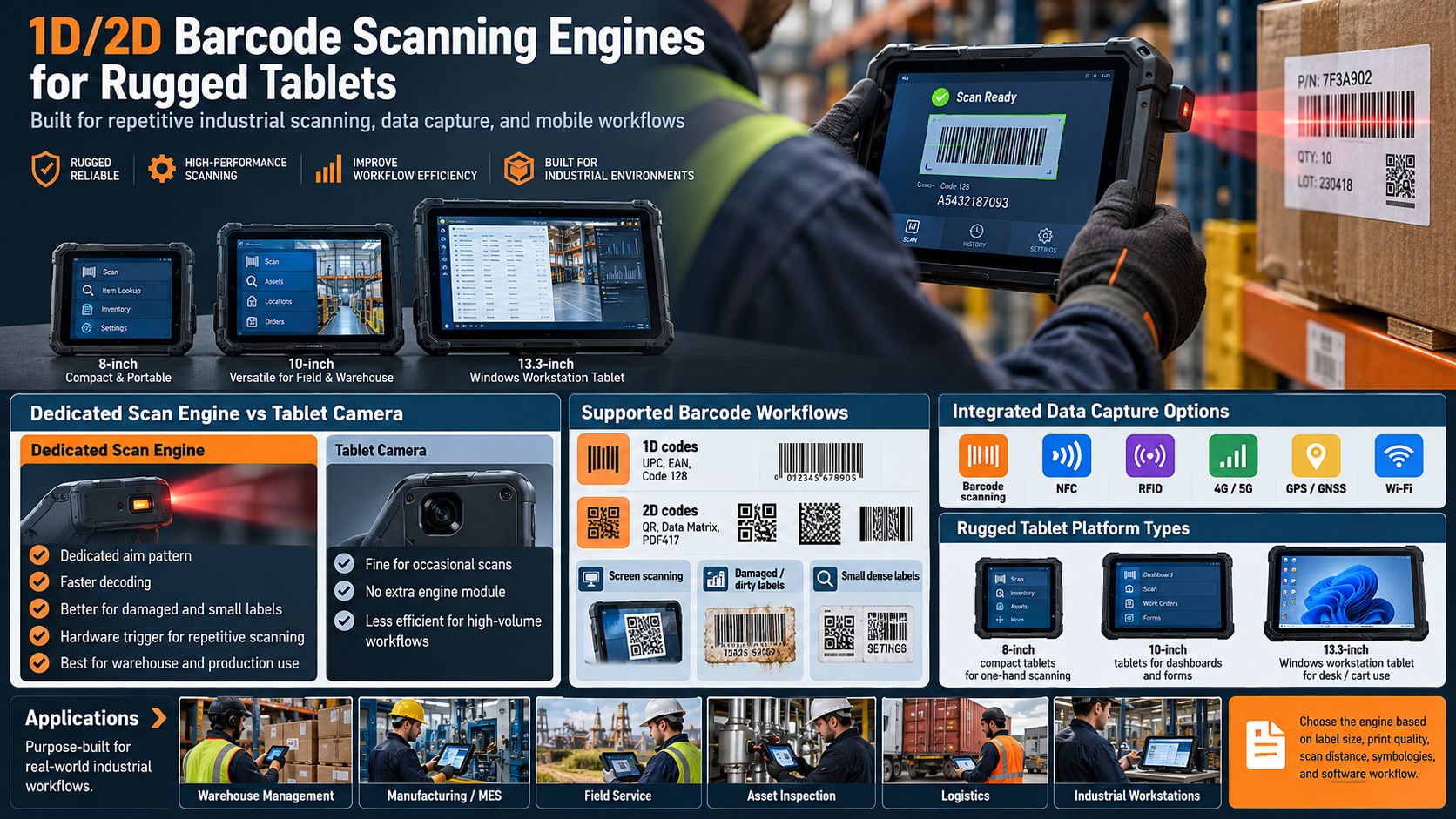
CENAVA Rugged Tablet Barcode Scanner Options
| Model | OS | Scanner Configuration | Key Advantage | Typical Application |
|---|---|---|---|---|
| A80ST | Android | N1 / N670 optional | Mainstream to higher-demand industrial scanning | Warehouse, logistics |
| A10ST | Android | N1 / N670 optional | Full-I/O industrial tablet + scanning | Manufacturing, field service |
| A109TB | Android 14 | N1 / N670 optional | 20,000mAh battery + barcode scanning | Long-shift inventory |
| A80PT | Android | 1D/2D optional | Compact 8-inch configurable data capture | Warehouse, inspection |
| A88ST | Android 16 | 1D/2D optional | Compact handheld operation | Inventory, mobile inspection |
| A10R | Android / Linux | 1D/2D optional | Industrial computing + scanning | Manufacturing, edge applications |
| W10N | Windows | N1 / N670 optional | Windows industrial software | MES, maintenance |
| W109NS | Windows 11 | N4680 / N1 optional | Windows + removable battery | Field and industrial scanning |
| W30NS | Windows 11 | Zebra SE4107 optional | Broad 1D/2D/OCR support | Enterprise Windows workflows |
Scanner options vary by model, and the engine is only part of the decision — symbologies, label size, print quality, scan distance and software all matter. Send us your label samples and we match the engine to them.
What Is a Barcode Scanning Engine?
Dedicated Scan Engine vs. Tablet Camera
A tablet camera reads barcodes through software, and for a few scans a day that is fine. Past that, the math changes. An engine aims with a dedicated pattern, decodes in firmware and fires from a hardware trigger — no framing, no focus hunting, no screen-tapping. It reads faster, reads in the dark, reads damaged labels and reads small codes. The camera costs nothing extra and handles the occasional scan. For warehouse and production-line work, we fit an engine. Every time.
Newland N1 Barcode Engine
Newland N1 is our mainstream option. It covers standard 1D/2D warehouse labels and does it well — for clean labels it is all the engine you need. Step up to the Honeywell N670 when labels get small, dense, damaged, or when the job needs OCR-A/OCR-B. The N670 costs more, and if your labels are clean we will tell you not to spend it. The W109NS carries the Honeywell N4680 as its higher option, and the 13.3-inch W30NS fits the Zebra SE4107 for broad 1D/2D/OCR enterprise work.
Zebra SE4107 Barcode Engine
Selected large-screen Windows rugged tablets such as the CENAVA W30NS can be configured with the Zebra SE4107.
The current CENAVA W30NS configuration lists the SE4107 as supporting a broad selection of:
- 1D barcodes
- 2D barcodes
- Postal codes
- OCR formats
This configuration is particularly suitable where a Windows rugged tablet needs to handle enterprise data collection together with desktop applications.
What Barcode Symbologies Should You Specify?
Do not request "a barcode scanner." Tell us the symbologies. Retail runs on UPC and EAN. Logistics runs on Code 128 and GS1-128. Manufacturing traceability runs on Data Matrix and QR. Transportation still prints PDF417. Not sure? Send sample labels — testing your real labels is the single best way to pick an engine, and we do it before you commit.
Barcode Scanning of Damaged and Dirty Labels
Industrial labels are not always clean.
Difficult Labels: Damaged, Low-Contrast, Small — Industrial labels get scratched, faded, wrinkled, printed badly. Our N670-class configurations are built for exactly that — but two honest notes. First, test your worst labels, not your best ones. Second, sometimes the fix is the printer, not the scanner; we have seen "scanner problems" disappear after a label-stock change. Small and dense codes — Data Matrix on PCBs, component labels, vial labels — need higher-resolution optics. Give us the minimum module size and we confirm readability.
Barcode Scanning on Screens
Some workflows require reading barcodes displayed on:
- Smartphones
- Tablets
- Computer monitors
- Electronic tickets
2D imaging engines are generally more appropriate than traditional laser-only scanners for screen-based codes.
If screen scanning is an important requirement, specify it during scanner selection and test the actual display devices being used.
Barcode Scanner Trigger Buttons
Physical trigger buttons beat on-screen buttons for repetitive scanning. The A88ST takes a dedicated scan key next to its optional engine. Placement, left- or right-handed use, gloves and hand straps all start to matter once a worker passes a few hundred scans per shift — tell us how your crews hold the device.
Our 8-inch line — A80ST, A80PT, A88ST — is the one-hand, all-shift format
- Picking
- Receiving
- Inventory
- Put-away
- Asset inspection
- Packing
- Shipping
Our 10-inch platforms — A10ST, A10R, W10N, W10Y — give more screen for WMS dashboards and forms
- WMS interfaces
- MES dashboards
- Work instructions
- Product images
- Equipment records
- Inspection forms
Need a fixed point that still scans? The 13.3-inch W30NS is a Windows workstation with a Zebra SE4107 built in — receiving stations, maintenance carts, industrial desks.
- Receiving stations
- Packing stations
- Maintenance carts
- Industrial workstations
- Detailed Windows applications
Android Barcode Scanning Tablets
Android suits mobile data collection. The workflow is: press the trigger → engine decodes → the app receives the value → the worker confirms → data syncs to WMS/ERP over Wi-Fi or 4G/5G. Our Android tablets add NFC, RFID and GPS options on top. Windows suits sites where the WMS or MES already runs on desktop software — W10N, W10Y, W109NS and W30NS keep that software untouched and add scanning to it.
Barcode Scanning + NFC
Barcode and NFC solve different identification problems.
Barcode plus NFC: the barcode identifies the part, the tag identifies the machine. A technician reads the tag, opens the asset record, scans the replacement component, closes the transaction. Barcode plus UHF RFID: tags for pallets, barcodes for cartons, NFC for people — many sites run all three, and our platforms combine them where enclosure space allows. Barcode plus 4G/5G: scan data syncs from yards, routes and sites with no Wi-Fi. Barcode plus GPS: every scan carries a location and a timestamp — useful for field assets and proof of delivery.
Barcode Scanning + RFID
Barcode and RFID are frequently deployed together rather than as alternatives.
Barcodes are inexpensive and visually identifiable.
UHF RFID can provide longer-range and multi-tag data capture.
A warehouse may therefore use:
- UHF RFID for pallet inventory
- 2D barcodes for individual cartons
- NFC for staff or equipment identification
Selected CENAVA tablet platforms can integrate multiple data-capture technologies, subject to enclosure and antenna constraints.
Barcode Scanning + 4G/5G
Mobile workers may need to scan outside warehouse Wi-Fi coverage.
Combining barcode scanning with cellular communication allows data to be synchronized from:
- Delivery routes
- Field service locations
- Outdoor yards
- Remote warehouses
- Utility sites
Selected rugged tablets support 4G or 5G configurations alongside barcode modules.
Barcode Scanning + GPS/GNSS
Barcode identifies the object.
GPS/GNSS can record where the scan occurred.
This combination is useful for:
- Field asset inspection
- Utilities
- Equipment yards
- Logistics
- Outdoor inventory
- Infrastructure maintenance
The application can associate the scanned ID with a location and timestamp.
Barcode Scanning for Warehouse Management
Warehouse and logistics. The highest-volume scanning there is — receiving, put-away, picking, packing, shipping, cycle counts. An 8-inch tablet with an engine ends the tablet-plus-scanner juggling act. Manufacturing. Raw material in, work-in-process tracked, components verified, finished goods out — Data Matrix and QR dominate here because more data fits on smaller labels, and the same tablet opens your MES. Field service and asset management. Scan the asset, open its history, log the work, move on — GPS and photos complete the record. One caution for healthcare buyers: our engine captures the identifier only. Validation and clinical workflow stay with your application and your organization.
Barcode Scanner Software Integration
The engine is half the system; software is the other half. Two routes. Keyboard wedge: the decoded value lands in the active field as if typed — zero code changes, works with almost anything. SDK/API: your app controls the engine directly — start/stop, symbology selection, trigger behavior, duplicate filtering. For WMS, MES or ERP projects, tell us the platform build, the input method you want and the network the data travels. We configure and test the full chain — Scan → Decode → Lookup → Confirm → Update — before volume.
Keyboard Wedge / Keyboard Emulation
One common barcode-integration approach is keyboard emulation.
After a scan, the decoded barcode value is inserted into the active application field as though it had been typed on a keyboard.
This can simplify integration with existing applications.
However, more advanced applications may require direct access to scanner events, symbology information or trigger controls through an SDK/API.
SDK and API Integration
Custom applications may need more control over the scan engine.
Potential functions can include:
- Start scan
- Stop scan
- Enable selected symbologies
- Configure trigger behavior
- Receive decoded data
- Filter duplicate scans
- Control scanner notifications
SDK/API availability depends on the actual engine and platform.
For OEM/ODM projects, software requirements should therefore be specified together with the hardware configuration.
Barcode Scanner Integration with WMS
A warehouse-management application may use a scanned value to identify:
- SKU
- Location
- Pallet
- Order
- Container
A typical process can be:
Scan → Decode → WMS Lookup → User Confirmation → Inventory Update
The WMS integration should be tested on the actual Android or Windows version used by the deployment.
Barcode Scanner Integration with MES
Manufacturing execution systems can use barcode scanning to identify:
- Work orders
- Employees
- Materials
- Components
- Machines
- Production batches
The rugged tablet can then display the corresponding production information.
For manufacturing environments, Ethernet or Wi-Fi connectivity can synchronize the scan data with the MES.
Barcode Scanner Integration with ERP
ERP systems can use barcode input for:
- Inventory
- Receiving
- Shipping
- Asset management
- Spare parts
- Production transactions
If the ERP application already accepts keyboard input, keyboard-emulation scanning may simplify integration.
Custom integrations may use dedicated APIs or middleware.
Barcode Scanner vs. RFID Reader
Barcode and RFID should be selected according to the workflow.
| Requirement | Barcode | RFID |
|---|---|---|
| Tag Cost | Low | Higher |
| Visual Label | Yes | Not required |
| Line of Sight | Required | Usually not |
| One-Item Precision | Excellent | Depends on workflow |
| Multi-Tag Reading | Limited | Strong with UHF |
| Reading Distance | Short to moderate | Short to long depending on RFID type |
| Easy Printing | Yes | Requires RFID tag |
| Existing Installed Base | Very large | Growing |
Many industrial projects use both technologies.
How to Choose a 1D/2D Barcode Engine
1. List every symbology — with samples, not memory.
2. Measure the smallest code. Module width decides the engine class.
3. State the scan distance. Close-range component work and forklift-distance pallet scans are different engines.
4. Rate your label quality honestly. Damaged or low-contrast labels point to N670-class.
5. Count the scans per shift. Hundreds or thousands justify a dedicated engine; a dozen a day does not.
6. Say whether screens are involved — phone and monitor codes need a 2D imager.
7. Send real labels. We test tablet + engine + your labels + your lighting + your distance before you order volume.
Why Choose CENAVA for Barcode Scanning Integration?
- Four engine families — N1, N670, N4680, SE4107 — across nine platforms
- Full 1D and 2D support with difficult-code and OCR options
- 8 to 13.3 inches, Android or Windows
- Barcode + RFID + NFC in one rugged device
- IP67/IP68 and MIL-STD-810H rugged builds, with 4G/5G and Wi-Fi
- OEM/ODM — we configure the full stack per SKU at factory: engine, trigger key, modules, OS, enclosure
Frequently Asked Questions About 1D/2D Barcode Scanning Engines
1. What is a 1D/2D barcode scanning engine?
It is a dedicated optical module installed inside a device to capture and decode linear and two-dimensional barcodes.
Professional scan engines are designed for repeated industrial data collection.
2. Can a 2D scanner also read 1D barcodes?
Yes. Every 2D imager we fit reads the common 1D symbologies as well.
3. Is a dedicated barcode scanner better than a tablet camera?
For occasional scanning, a camera may be sufficient.
For repetitive industrial scanning, dedicated engines usually provide faster and more consistent aiming and decoding, particularly with difficult labels.
4. Which is better, N1 or N670?
N1 for mainstream warehouse labels. N670 for small, dense, damaged labels or OCR. If your labels are clean, we will tell you to save the money.
5. Does CENAVA offer Zebra barcode engines?
Yes.
The W30NS currently lists Zebra SE4107 as its optional 2D scan engine.
6. Can CENAVA tablets read damaged barcodes?
Selected barcode configurations are designed to decode damaged, dirty or poorly printed 1D/2D codes under suitable conditions. Send your worst labels and we test them.
7. Can rugged tablets read QR and Data Matrix codes?
Yes, when configured with an appropriate 2D scanning engine.
Confirm the exact required symbologies during project configuration.
8. Can barcode scanning be combined with RFID and NFC?
Yes on selected models.
However, module locations, antennas and enclosure space can limit which functions can be installed simultaneously.
Enclosure space and antenna layout set the limit, so give us the full module list early.
9. Can barcode data be sent directly to WMS or ERP software?
Yes, provided the application supports the scanner input method and network architecture.
Barcode data can be passed to compatible Android or Windows applications and synchronized through Wi-Fi, Ethernet or cellular networks.
10. Which barcode scanning engine should I choose?
Five questions: symbologies, smallest code, distance, label quality, volume. Mainstream work points to N1; difficult codes or OCR point to N670-class; broad enterprise Windows work points to the SE4107 on the W30NS. Then test real labels.
Camera Scanning vs Scan Engines
Camera-app "scanning" depends on light, focus and user patience. An integrated industrial scan engine (SE-series class) uses aiming patterns, fast autofocus or imager optics, and decode firmware tuned for damaged, curved, distant or poorly printed codes — reading in milliseconds, in sunlight, at angles, through shrink wrap.
Choosing the Right Engine
- 1D laser: cheapest, high motion tolerance, best for standard paper barcodes in warehouses
- 2D imager (standard): reads QR, DataMatrix, PDF417 — required for asset tags, driver licenses, DPM codes
- Extended-range imager: scans pallet labels from forklift distance (several meters)
- DPM-optimized: direct-part marks etched on metal in manufacturing and aerospace
Why Integration Beats Cases and Dongles
Engines built into the tablet share the device battery, survive the same drops and IP rating, expose scan-trigger hardware keys for gloved use, and inject data directly into any app field — no pairing, no extra charging, nothing to lose. CENAVA rugged tablets offer integrated 1D/2D engine options across Windows and Android platforms, configurable per SKU at factory.
Need a Custom Rugged Solution?
Our engineering team can tailor rugged hardware to your exact environment, certifications and workflow. Tell us your requirements.
Talk to an Engineer All Technologies


