













































-1.jpg)












.jpg)










Hot-Swappable Battery Design
Hot-Swappable Battery Design Main-plus-backup and dual-battery architectures for rugged tablets and laptops — swap power without shutting down.
Hot-Swappable Battery Design for Rugged Tablets and Laptops
A hot-swappable battery system allows the main battery of a rugged tablet or laptop to be replaced while the computer remains powered on, reducing interruptions during long shifts, diagnostics and continuous industrial operations.
Unlike a conventional removable battery, a true hot-swap design requires another temporary power source—such as an internal bridge battery or a second active battery—to keep the operating system, applications and communications running while the main battery is removed.
CENAVA uses several hot-swap architectures across selected rugged tablets and laptops, including an 8300mAh removable main battery with a 300mAh backup battery on selected Windows tablets and dual smart-battery systems on rugged laptops.
These designs are intended for applications such as industrial maintenance, field service, vehicle diagnostics, warehouse operations, utilities and other workflows where shutting down the device during a shift can interrupt work.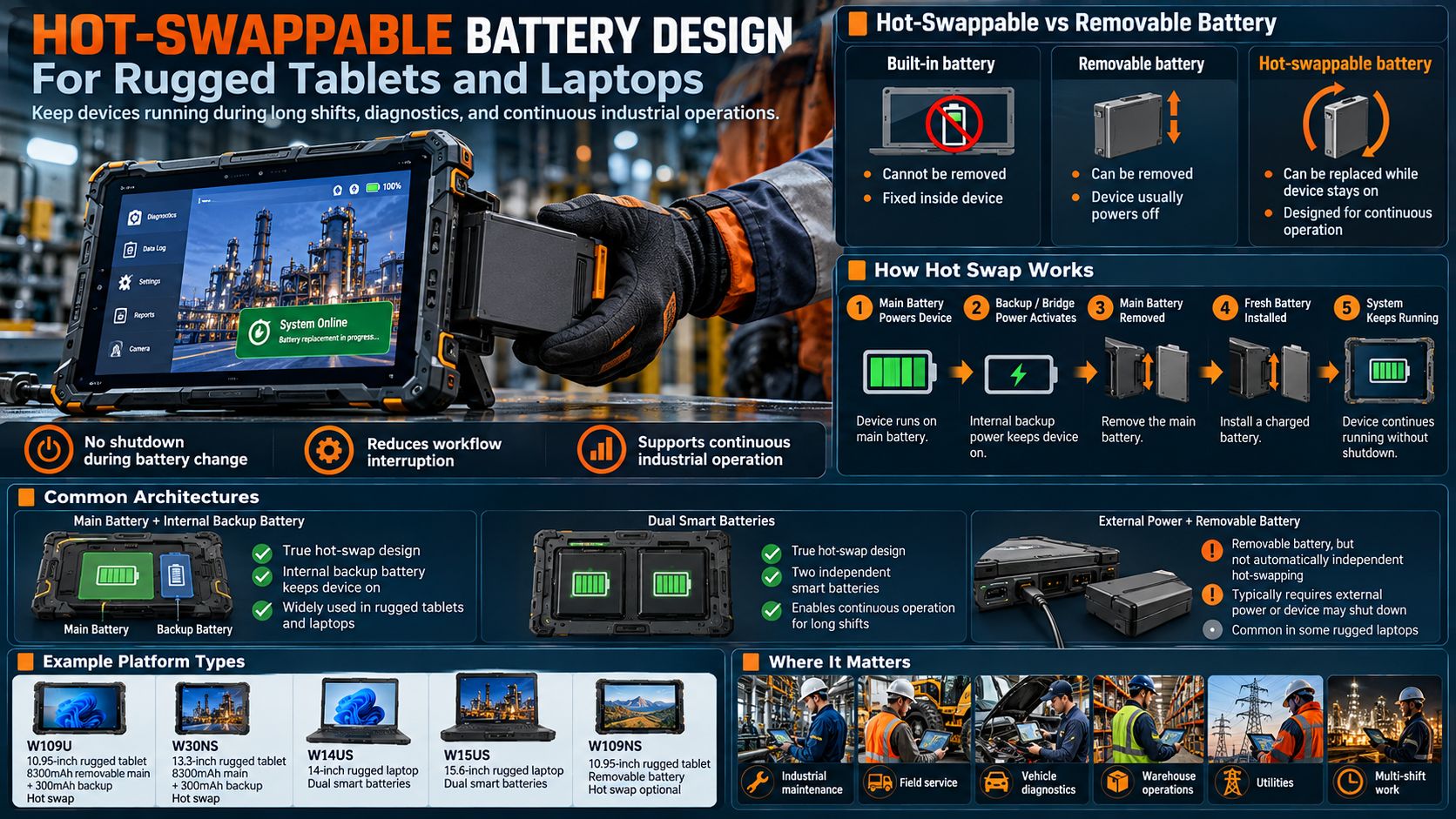
What Is a Hot-Swappable Battery?
A hot-swappable battery is a battery that can be replaced while the computer continues operating.
The basic process is:
Main Battery Powers Device → Backup Power Becomes Available → Main Battery Is Removed → Spare Main Battery Is Installed → System Returns to Normal Power
The user does not need to:
- Shut down Windows
- Close diagnostic software
- Disconnect from the network
- Save and reopen every application
- Reboot the device
This can significantly reduce interruption during continuous industrial work.
Hot-Swappable Battery vs. Removable Battery
These terms are often incorrectly used as synonyms.
They describe different capabilities.
| Battery Design | Can Battery Be Removed? | Device Stays On During Removal? |
|---|---|---|
| Built-in battery | No | Not applicable |
| Removable battery | Yes | Usually no |
| Hot-swappable battery | Yes | Yes |
| Dual hot-swap battery | Yes | Yes, another battery maintains power |
| Main + bridge battery | Yes | Yes, bridge battery temporarily maintains power |
A removable battery allows replacement.
A hot-swappable battery allows replacement without shutting down the computer.
This distinction is particularly important when specifying rugged computers for industrial procurement.
How Does a Hot-Swap Battery System Work?
A true hot-swap system requires an electrical architecture that can temporarily maintain device power after the primary battery is removed.
There are several common approaches.
Main Battery + Internal Backup Battery
One large battery provides normal operating power.
A smaller internal battery temporarily keeps the system alive while the main pack is changed.
This architecture is used on selected CENAVA Windows rugged tablets.
Dual Smart Batteries
Two batteries are installed.
When one battery is removed, the second continues powering the computer.
This architecture is used on selected CENAVA rugged laptops.
External Power + Removable Battery
In some systems, the main battery can be replaced while the device is connected to vehicle or AC power.
This can provide serviceability, but it should not automatically be described as independent hot-swapping unless the product supports continued operation when external power is removed.
CENAVA Hot-Swappable Battery Platforms
| Model | Device Type | Battery Architecture | Hot Swap | Primary Application |
|---|---|---|---|---|
| W109U | 10.95" Windows rugged tablet | 8300mAh removable main + 300mAh backup | Standard | Diagnostics, multi-shift service |
| W30NS | 13.3" Windows rugged tablet | 8300mAh removable main + 300mAh backup | Standard | Large-screen industrial field work |
| W14US | 14" rugged laptop | 5100mAh + 2200mAh dual smart batteries | Standard | Field engineering, maintenance |
| W15US | 15.6" rugged laptop | Dual smart-battery architecture | Standard | Workshop and industrial engineering |
| W109NS | 10.95" Windows rugged tablet | 8300mAh removable battery | Custom option | Service, vehicle and inspection |
The exact battery architecture should always be confirmed for the selected configuration.
W109U Hot-Swappable Battery Design
W109U is one of CENAVA's clearest tablet implementations of true hot-swap battery architecture.
It combines:
- 8300mAh removable main battery
- 300mAh backup battery
- Hot-swap operation
- ≥8-hour rated runtime under specified test conditions
- Windows 11
- Gigabit Ethernet
- RS232
- USB-A
- USB-C
- HDMI
- POGO expansion
The backup battery provides temporary power while the main 8300mAh pack is removed and replaced.
This makes W109U particularly suitable for:
- Equipment diagnostics
- Vehicle systems
- Industrial maintenance
- Long field assignments
- Multi-shift operation
- Mobile Windows workstations
Its current CENAVA product listing specifically identifies the 8300mAh removable hot-swap battery together with the 300mAh backup battery and positions the model for diagnostics, vehicle systems and continuous multi-shift operation.
W30NS Hot-Swap Battery Architecture
W30NS uses the same basic main-plus-backup concept in a larger 13.3-inch Windows rugged tablet.
Its battery system includes:
- 8300mAh removable main battery
- 300mAh backup battery
- 11.4V architecture
- Hot-swap capability
- ≥6-hour rated runtime under the stated test conditions
The larger display is useful for technicians who need to view:
- Wiring diagrams
- Windows diagnostic software
- Production records
- Detailed maintenance interfaces
- Multiple application windows
The W30NS runs the same 8300mAh main + 300mAh backup architecture as the W109U, in a larger 13.3-inch chassis.
W14US Dual-Battery Hot-Swap Design
Rugged laptops can use a different hot-swap architecture.
W14US uses two smart batteries:
- 5100mAh main battery
- 2200mAh secondary battery
The system allows one battery to maintain computer operation while the other is being replaced.
This is particularly useful for engineers who need:
- A physical keyboard
- Windows 11 Pro
- Multiple USB peripherals
- Dual Ethernet
- RS232
- Full desktop applications
CENAVA specifically states that the W14US dual-battery design allows the system to remain powered while the appropriate battery is swapped.
W15US Dual-Battery Architecture
W15US provides a larger 15.6-inch alternative for workshop and engineering environments.
Its current specification includes:
- Dual smart batteries
- Hot-swap support
- ≥6-hour rated runtime
- Windows 11 Pro
- Four USB-A ports
- USB-C
- Dual 2.5GbE
- RS232
- IP65 protection
The main battery can be replaced while the bridge battery keeps the system operating, provided the correct battery-swap procedure is followed.
This type of laptop is useful where continuous operation must be combined with a full keyboard and multiple physical connections.
W109NS: Removable Battery vs. Optional Hot Swap
W109NS illustrates why removable and hot-swappable should not be treated as the same specification.
Its standard configuration includes:
- 8300mAh removable battery
- ≥8-hour rated runtime
However, its current product page describes hot-swap as a customizable option rather than a standard function.
The W109NS ships with a removable 8300mAh battery. Hot-swap (bridge battery plus firmware support) is a customization option — confirm it appears on your order configuration before relying on mid-shift swaps.
Built-In Battery vs. Hot-Swap Battery
Some applications benefit more from a sealed built-in battery.
Others benefit from replaceability.
| Requirement | Built-In Battery | Hot-Swap Battery |
|---|---|---|
| Simple enclosure design | Excellent | More complex |
| Continuous multi-shift use | Limited | Excellent |
| User battery replacement | No | Yes |
| Spare battery strategy | Limited | Excellent |
| Minimal battery doors | Excellent | Requires access |
| Long single-shift use | Good with large pack | Excellent |
| 24/7 field rotation | Less suitable | Excellent |
For example, W10Y uses a built-in 5550mAh battery, with a larger 10,000mAh configuration available, but the current product specification identifies the battery as non-removable rather than hot-swappable.
This can still be an appropriate design for workers who can charge the tablet between shifts.
High-Capacity Battery vs. Hot-Swap Battery
There are two common approaches to long runtime.
High-Capacity Battery
Increase the battery capacity.
Advantages:
- Simpler workflow
- No battery change required
- Fewer loose accessories
Disadvantages:
- Additional weight
- Eventually requires charging
- Cannot instantly return to full capacity
Hot-Swappable Battery
Replace the depleted battery with a charged spare.
Advantages:
- Potentially continuous runtime
- Easier multi-shift operation
- Full battery capacity restored immediately
Disadvantages:
- Spare batteries must be managed
- Charging infrastructure is required
- Battery-door design is more complex
The better solution depends on the workflow.
A worker completing one long shift may prefer a large-capacity battery.
A device shared across two or three shifts may benefit more from hot-swapping.
Why Hot-Swap Matters for Windows Rugged Tablets
Windows applications take time to reopen after shutdown — a technician mid-session may have a diagnostic suite, a CAD viewer and a VPN session open at once.
A technician may be running:
- PLC software
- Diagnostic applications
- SCADA clients
- MES applications
- Remote-support software
- GIS
- Vehicle diagnostic tools
- Database applications
Lose power and all three come back slowly, one login at a time. Hot swap keeps the session alive.
- Restart Windows.
- Reconnect to equipment.
- Reopen applications.
- Restore the work session.
- Reconnect to Wi-Fi or cellular networks.
- Resume the diagnostic process.
Hot-swapping reduces these interruptions.
Hot-Swap Batteries for Diagnostics — Bench and Vehicle
A diagnostic session is the worst time to lose power. The tablet sits connected to the vehicle or machine — OBD link open, software mid-read — and a shutdown kills the session, not just the screen.
With hot swap, the technician changes the pack with the software environment still active:
- ECU reads and re-flashes that cannot be restarted halfway
- Multi-vehicle bay work where the tablet moves car to car
- Off-site diagnostics away from the workshop's AC outlets
We point most diagnostic buyers at the W109U — hot swap, Windows, Gigabit RJ45 and RS232 in one 10.95-inch tablet. Need a full keyboard? The W14US and W15US laptops run the same workflow on dual smart batteries.
Hot-Swap Batteries for Shared, Multi-Shift Fleets
A shared device has no owner to babysit its charge. Shift 1 runs 6:00–14:00, shift 2 takes the same tablet at 14:00 — and a conventional tablet needs a charger in between.
With battery rotation, the device never leaves service:
- Battery A powers the device → Battery B charges in the dock → swap → repeat
- Spare packs tracked and replaced individually as they age, not the whole tablet
- Charging bases for the fleet — we list an optional charging base for the W30NS and W109NS
For fixed warehouse fleets this also simplifies management: one pool of devices, one pool of batteries, one charging shelf.
Hot-Swap Batteries for Off-Grid Field Work
Field service, utility maintenance and construction share one problem: the nearest outlet is far away, and the workday is long. The answer is the same in all three — carry charged spares and swap, instead of hunting for power:
- Field service: a full day of calls with no return trip to a charger
- Utilities: remote substations, pipelines and towers with no AC at all
- Construction: no charging cables strung around heavy machinery
The swap takes seconds: depleted pack out, charged pack in, work continues. Temperature still matters — cold sites cut effective runtime, so we tell winter projects to size the spare count from a cold-weather test, not from the datasheet.
Hot-Swap Battery Design for Rugged Laptops
A rugged laptop has different space and power requirements from a tablet.
Dual-battery architecture is particularly useful because laptops normally consume more power and need to support:
- Larger displays
- Full keyboards
- Higher-performance processors
- Multiple peripherals
On W14US and W15US, one battery can continue supplying the computer while the removable pack is replaced.
This allows field engineers to maintain a traditional laptop workflow without accepting conventional fixed-battery limitations.
What Is a Bridge Battery?
A bridge battery is a smaller secondary battery used to maintain power temporarily during replacement of the main battery.
It is not normally intended to provide the same runtime as the main battery.
Its purpose is to create a short transition window.
A typical architecture is:
8300mAh Main Battery → Normal Operation
When main battery is removed:
300mAh Bridge Battery → Temporary System Power
After the replacement battery is inserted:
New 8300mAh Main Battery → Normal Operation Restored
W30NS uses this type of 8300mAh + 300mAh architecture.
Why Not Use the Bridge Battery as a Normal Battery?
The bridge battery is relatively small.
It is designed to maintain the system during the battery exchange rather than support long standalone operation.
Users should therefore change the main battery promptly.
The bridge battery should be treated as part of the hot-swap mechanism, not as a second full-shift power pack.
Battery Swap Procedure
The exact procedure depends on the device, but a typical hot-swap workflow is:
1. Check Battery Status
Confirm that backup power is available.
2. Prepare the Replacement Battery
Have a charged compatible pack ready before removing the active battery.
3. Unlock the Battery
Release the battery latch according to the product instructions.
4. Remove the Main Battery
The bridge or second battery maintains temporary power.
5. Insert the Charged Battery
Install it fully into the battery compartment.
6. Lock the Battery
Confirm that the pack is mechanically secured.
7. Check Charging and Battery Status
Verify that the system recognizes the replacement battery.
Users should follow the model-specific manual rather than assuming all hot-swap systems follow identical procedures.
Why Swap Time Matters
Backup batteries are designed for temporary operation.
The time available for replacement may depend on:
- Backup battery state of charge
- Processor workload
- Screen brightness
- Cellular activity
- USB peripherals
- Battery health
- Ambient temperature
A battery replacement should therefore be prepared before removing the main pack.
Industrial software should not assume that a bridge battery provides unlimited runtime.
Battery Management System
Hot-swappable systems require more than two physical batteries.
Battery-management electronics may need to monitor:
- Battery voltage
- Current
- Charge level
- Temperature
- Charging state
- Battery presence
The operating system also needs to respond correctly as the power source changes.
A well-designed system should transition between the main battery and backup source without interrupting normal computer operation.
Hot-Swap Battery and Sleep Mode
Hot swapping should not be confused with replacing a battery while the device is asleep.
A true hot-swap architecture allows the computer to remain powered.
Depending on the device and operating-system configuration, the screen may remain active and applications can continue running.
Some organizations may nevertheless configure power-management policies to reduce consumption during the swap process.
Hot-Swap Battery and Network Connections
One operational advantage of hot swapping is that the tablet can remain running while battery packs are changed.
This can help preserve application state and potentially reduce the need to rebuild:
- Wi-Fi sessions
- VPN sessions
- Cellular connections
- Remote desktop sessions
- Industrial application sessions
Actual connection continuity still depends on the operating system, network and application.
Hot swap maintains power; it does not independently guarantee application or network-session persistence.
Hot-Swap Battery and External Peripherals
Industrial tablets may have peripherals attached through:
- USB
- Ethernet
- RS232
- HDMI
- POGO
- Docking connectors
Keeping the tablet powered during battery replacement can reduce disruption to these workflows.
However, peripheral power consumption also affects how long a small bridge battery can maintain the system.
High-power USB devices should therefore be considered when validating the hot-swap process.
Spare Battery Strategy
Hot-swappable hardware only pays off with a battery plan behind it. Our baseline kit: 1 device + 2 or 3 main batteries + an external charger. One pack works, one charges, one waits.
One battery powers the device.
Another battery charges.
A third can be kept as reserve for long shifts or remote work.
The correct ratio depends on:
- Shift length
- Device power consumption
- Battery charging time
- Number of users
- Availability of AC or vehicle power
Battery Charging Bases
A spare battery is useful only if it can be charged efficiently.
For fleets of rugged devices, organizations may use dedicated battery charging bases or charging stations.
For example, CENAVA lists an optional battery charging base for W30NS and W109NS configurations.
Charging infrastructure should be planned at the same time as the tablets.
Hot-Swap Battery Lifecycle Management
Rechargeable batteries gradually lose usable capacity over time.
A fleet using removable batteries can manage this more easily because individual battery packs can be tracked and replaced separately from the computer.
A battery-management program can monitor:
- Battery age
- Charge cycles
- Runtime
- Physical condition
- Charging behavior
- Replacement date
This can extend the practical service life of the computing platform.
Removable Batteries and Serviceability
Even when continuous hot swapping is not required, a removable battery can improve serviceability.
If a battery reaches the end of its useful life, the organization can replace the pack instead of opening the device or replacing the entire computer.
This is one advantage of W109NS's removable 8300mAh design even when the optional hot-swap configuration is not selected.
Battery Capacity Is Not the Same as Runtime
Two tablets with the same mAh rating can have different operating times.
Runtime depends on:
- Battery voltage
- Processor
- Display size
- Screen brightness
- Wi-Fi
- 4G/5G
- GPS
- Barcode/RFID modules
- Connected USB devices
- Application workload
- Temperature
For this reason, battery design should be evaluated using actual operating conditions rather than mAh alone.
Hot-Swap Battery Performance in Cold Weather
Temperature can influence battery performance.
In cold environments, effective battery runtime and power delivery may differ from room-temperature operation.
Cold-storage and winter projects should therefore test:
- Main battery runtime
- Backup battery swap window
- Charging conditions
- Screen operation
- Connected peripherals
A hot-swap system can help by allowing workers to replace a cold or depleted battery with a charged spare, but it does not remove the effects of temperature on battery chemistry.
Hot-Swap Battery Performance at High Temperatures
High ambient temperatures can also affect battery behavior and longevity.
For vehicle, outdoor and industrial applications, buyers should consider:
- Ambient temperature
- Direct sunlight
- Processor load
- Charging temperature
- Battery enclosure temperature
Wide-temperature device specifications and battery requirements should be evaluated together.
Hot-Swap Battery + Vehicle Power
Vehicle-mounted rugged tablets may have access to vehicle power.
A typical architecture can include:
Vehicle Power → Dock/Charger → Rugged Tablet → Removable Battery
The removable battery provides mobility when the tablet is taken away from the vehicle.
A hot-swap configuration adds another layer of operational flexibility because the tablet can continue operating when a battery is replaced away from the dock.
Hot-Swap Battery + Docking Station
Docking stations can reduce battery consumption during stationary operation.
A technician might use the tablet:
Mounted in dock → remove tablet → perform inspection → return to dock
Hot-swappable batteries extend this workflow further when the tablet remains away from the docking station for long periods.
This is particularly useful for field service, dispatch and vehicle applications.
Hot-Swap Battery + Windows 11
Windows rugged tablets are especially strong candidates for hot-swappable batteries because users may run complex desktop applications.
Selected CENAVA hot-swap tablets use Windows 11 and provide PC-class connectivity.
Applications can include:
- Diagnostics
- Maintenance software
- ERP
- MES
- SCADA
- Windows field-service applications
- Vehicle software
The ability to replace the battery without rebooting Windows can save time throughout repeated field sessions.
Hot-Swap Battery + Industrial Interfaces
A hot-swappable rugged tablet becomes more valuable when it also functions as an industrial computer.
W109U combines the hot-swap architecture with:
- Gigabit RJ45
- DB9 RS232
- HDMI
- USB-C
- USB-A
- POGO
This allows one device to support equipment connectivity and continuous field operation.
W30NS provides similar industrial I/O on a larger 13.3-inch platform.
Hot-Swap Battery + 4G/5G
Our hot-swap platforms offer 4G/5G configurations. The modem stays live through the swap — though session persistence still depends on the modem, OS and network, as covered above.
Hot-Swap Rugged Tablet vs. Power Bank
A power bank can extend tablet runtime, but it is not equivalent to an integrated hot-swap battery architecture.
| Feature | Hot-Swap Battery | External Power Bank |
|---|---|---|
| Integrated into device | Yes | No |
| Extra cable required | No | Usually |
| Fast battery replacement | Yes | Not applicable |
| Rugged deployment | Designed into platform | Depends on power bank |
| Spare battery rotation | Yes | No |
| External cable risk | Low | Higher |
| Vehicle/field ergonomics | Better integrated | Less integrated |
Power banks can still be useful in some environments, but integrated hot-swappable batteries provide a cleaner system architecture for professional mobile deployments.
Hot-Swap Rugged Tablet vs. Fixed 20,000mAh Battery
A large fixed battery and hot-swap system solve the same general problem in different ways.
20,000mAh Fixed Battery
Best for:
- Long single shifts
- Fewer accessories
- Workers who do not want to change batteries
Hot-Swappable Battery
Best for:
- Multi-shift operation
- Devices shared among workers
- Continuous diagnostics
- Remote work lasting longer than one battery cycle
Neither approach is universally better.
The selection should be based on the duty cycle.
Which Applications Benefit Most from Hot-Swap Batteries?
Hot-swapping delivers the most value when device shutdown has an operational cost.
Strong use cases include:
- Industrial maintenance
- Vehicle diagnostics
- Field service
- Manufacturing
- Warehouse operations
- Utilities
- Telecommunications
- Mobile workstations
- Equipment commissioning
- Multi-shift operations
For occasional office use, hot swapping may provide little benefit.
How to Choose a Hot-Swap Rugged Tablet
1. Confirm It Is True Hot Swap
Removable does not mean hot-swappable — the W109NS on this page is removable, and only our customized configuration adds the swap capability. Ask for the backup power source by name.
2. Check Main Battery Capacity
Estimate normal runtime before determining the number of spare batteries.
3. Understand the Backup Architecture
Determine whether the device uses:
- Bridge battery
- Dual full batteries
- External-power-assisted swapping
4. Check the Swap Procedure
Understand which battery can be removed and in what order.
5. Verify Runtime
Use actual workload tests rather than battery capacity alone.
6. Plan Spare Batteries
Determine how many packs are required per device and per shift.
7. Plan Charging Infrastructure
Include spare-battery chargers or charging bases where appropriate.
8. Consider Temperature
Cold and hot environments can affect battery behavior.
9. Check Industrial I/O
Confirm RJ45, RS232, USB, HDMI and docking requirements.
10. Validate the Complete Workflow
Before fleet deployment, test:
Device + main battery + backup battery + spare battery + charger + peripherals + software + actual shift conditions
Why Choose CENAVA Hot-Swappable Rugged Computers?
True hot swap on tablets — W109U and W30NS pair a removable 8300mAh main battery with a 300mAh bridge cell as standard.
Dual smart batteries on laptops — W14US and W15US keep running on one pack while you swap the other.
Industrial I/O included — Gigabit RJ45, RS232, USB and HDMI on the hot-swap platforms, not as add-ons.
Fleet charging — optional battery charging bases for W30NS and W109NS; we quote them with the fleet.
Project-level battery engineering — capacity, charging, docking, vehicle power and enclosure reviewed together for qualified OEM/ODM projects.
Frequently Asked Questions About Hot-Swappable Battery Design
1. What is a hot-swappable battery?
A hot-swappable battery can be removed and replaced while the computer remains powered on.
Another battery or backup power source temporarily maintains system operation.
2. Is a removable battery the same as a hot-swappable battery?
No.
A removable battery can be taken out.
A hot-swappable battery can be taken out without shutting down the computer.
3. How does a rugged tablet stay powered during a battery swap?
A small internal bridge battery holds the system while the main pack is out — see "What Is a Bridge Battery?" above for the 8300mAh + 300mAh architecture our Windows tablets use.
4. Can I use the 300mAh backup battery as the normal battery?
It is primarily designed to maintain temporary system power while the main battery is being replaced.
The main battery should be reinstalled promptly.
5. Which CENAVA rugged tablets support standard hot swapping?
Current examples include W109U and W30NS.
Both use removable main batteries together with backup power.
6. Does W109NS support hot swapping?
The standard W109NS has an 8300mAh removable battery.
Its current specification lists hot-swap as a customizable option rather than a standard feature.
7. Do CENAVA rugged laptops support hot-swap batteries?
Yes.
W14US and W15US use dual smart-battery architectures designed to support battery replacement while the device remains operating.
8. Are hot-swappable batteries useful for multi-shift work?
Yes.
Workers can replace a depleted main battery with a charged spare instead of taking the computer out of operation for several hours.
9. Is a 20,000mAh battery better than hot swapping?
Not necessarily.
A 20,000mAh battery is useful for long single-shift operation.
Hot swapping is more useful when the computer needs to continue operating across multiple battery cycles or multiple shifts.
10. Which CENAVA hot-swap design should I choose?
Choose W109U for a compact Windows rugged tablet with strong industrial I/O and standard hot-swap capability.
Choose W30NS when a larger 13.3-inch Windows display is required.
Choose W14US when a full keyboard and 14-inch rugged laptop form factor are preferred.
Choose W15US for larger-screen laptop applications.
Consider W109NS when a removable 8300mAh battery is sufficient or when a customized hot-swap version is required.
The final selection should consider runtime, operating system, screen size, interfaces, shift length and charging strategy.
Why Hot-Swap Matters
In logistics, inspection and public-safety shifts, a tablet that dies at 60% of the workday is worse than no tablet. Hot-swappable battery systems carry two batteries: one is removed and replaced while the second keeps the system alive — the device never sleeps, apps never close, and no data is lost.
A bridge circuit holds the main battery bus long enough — typically several minutes — for a trained user to eject the drained pack and click in a charged one. Well-engineered implementations add:
- Bridge battery indicators — on-screen countdown so swaps never happen under time pressure
- Single-bay external chargers — charge fleets of packs off the device
- Sealed battery doors — IP-rated latches that survive thousands of open/close cycles and gloved hands
- Battery health telemetry — cycle counts and capacity reporting for fleet management
Shift Coverage Math
With 8-10 hours per main pack and two packs in rotation, a two-battery kit covers a 24-hour operation with one spare charged in the dock. For cold-chain and outdoor winter use, ask us for packs specified to deliver full capacity at -20°C — we confirm low-temperature performance per battery model, not per marketing line.
Need a Custom Rugged Solution?
Our engineering team can tailor rugged hardware to your exact environment, certifications and workflow. Tell us your requirements.
Talk to an Engineer All Technologies


