













































-1.jpg)












.jpg)









Sunlight-Readable Display Technology
How 1000-nit high-brightness panels, anti-reflective bonding and optical lamination keep screens usable in direct outdoor sunlight.
Sunlight-Readable Display Technology for Rugged Tablets
Take a standard tablet outdoors at midday and the screen turns into a mirror. We build sunlight-readable displays to stop that — and brightness is only half of how they work.
Display brightness is one of the most important factors, but sunlight readability is not determined by brightness alone.
A practical outdoor display system should be evaluated according to:
- Screen brightness
- Ambient reflection
- Contrast
- Touch-glass construction
- Surface coatings
- Viewing angle
- Display resolution
- Glove and wet-hand operation
- Power consumption
- Thermal performance
CENAVA rugged tablets commonly use high-brightness IPS displays ranging from approximately 700 nits to optional 1000-nit configurations on selected models.
These displays are designed for construction, utilities, transportation, agriculture, field service, warehouse docks, surveying and other environments where workers regularly move between indoor and outdoor light.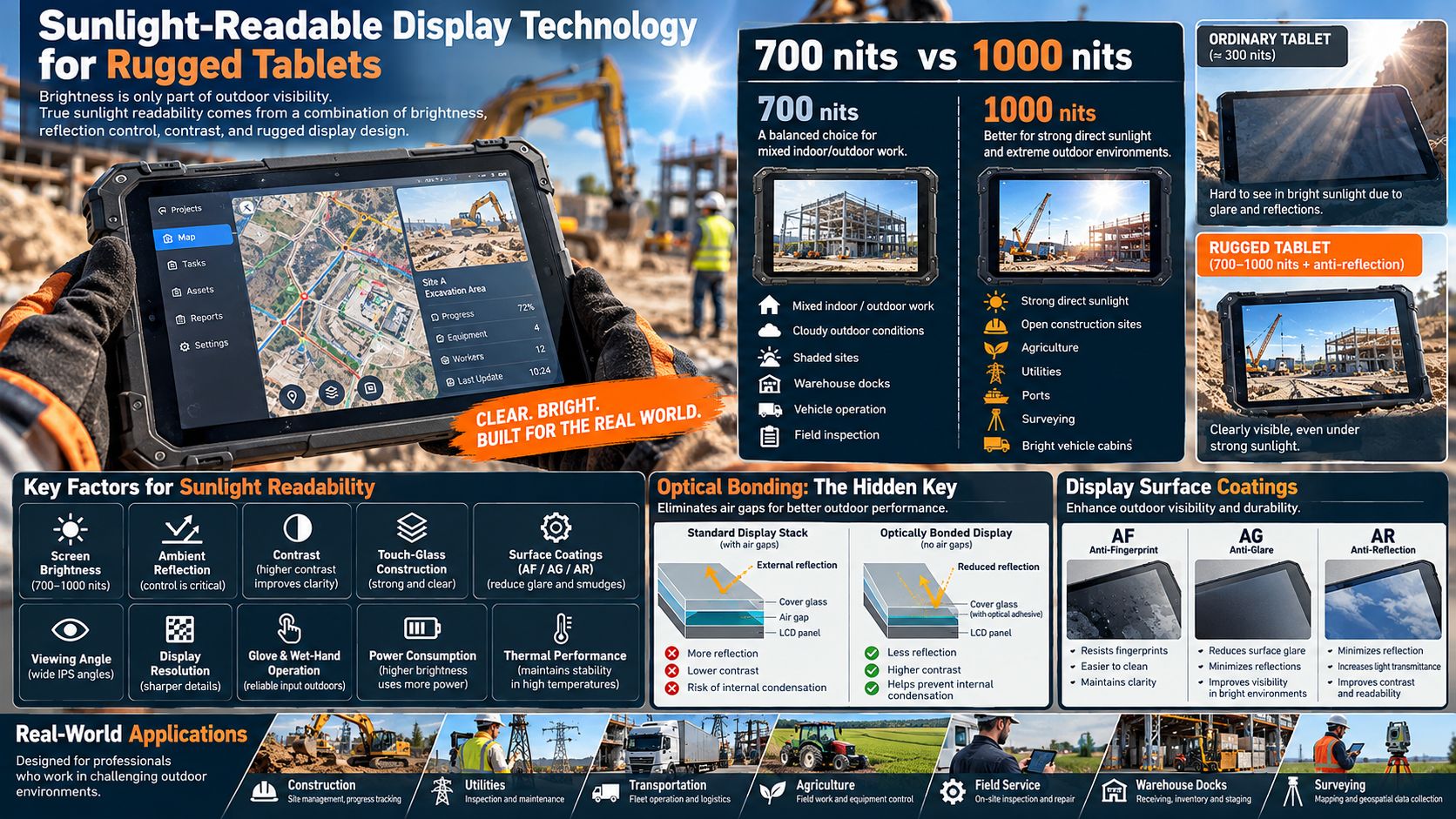
What Is a Sunlight-Readable Display?
A sunlight-readable display is a screen designed to remain sufficiently visible under strong ambient light.
Inside an office, the display only needs to compete with relatively moderate artificial lighting.
Outdoors, the screen may need to compete with:
- Direct sunlight
- Reflections from concrete
- Vehicle windshields
- Water surfaces
- Snow
- Bright metal surfaces
- Open-sky glare
As ambient light increases, reflected light from the display surface can reduce perceived contrast.
A sunlight-readable display therefore needs enough luminance and sufficiently controlled surface reflection to preserve visible contrast.
What Does “Nit” Mean?
Display brightness is commonly measured in nits, which are equivalent to candela per square meter (cd/m²).
A larger nit value means the display can emit more light.
For rugged tablets, common brightness ranges include:
| Brightness | Typical Environment |
|---|---|
| 300–500 nits | Indoor office environments |
| 400–600 nits | Indoor industrial use |
| 600–800 nits | Mixed indoor/outdoor work |
| 800–1000 nits | Bright outdoor environments |
| 1000+ nits | Strong glare and direct-sunlight applications |
CENAVA's own rugged-tablet brightness guide recommends matching brightness to the real working environment because higher brightness improves visibility but also increases power consumption.
Is 700 Nits Sunlight Readable?
A 700-nit display can provide good visibility for many outdoor industrial applications.
It is particularly suitable for:
- Cloudy outdoor conditions
- Shaded construction areas
- Warehouse loading docks
- Vehicle operation
- Field inspection
- Outdoor maintenance
- Mixed indoor/outdoor work
Most of our rugged tablets ship a 700-nit panel as standard. Take the W10Y: a 10.1-inch 1920×1200 IPS screen rated at 700 cd/m², built for outdoor inspections and industrial field work.
However, 700 nits should not be interpreted as identical visibility under every type of direct sunlight.
Surface reflection, viewing angle and screen orientation also affect usability.
When Should You Choose 1000 Nits?
A 1000-nit display is better suited to environments where the tablet is frequently exposed to stronger sunlight or glare.
Typical applications include:
- Open construction sites
- Agricultural fields
- Utility inspection
- Outdoor equipment service
- Fleet yards
- Ports
- Mining support
- Surveying
- Bright vehicle cabins
700 Nits vs. 1000 Nits
The correct brightness depends on how and where the tablet is used.
| Requirement | 700 Nits | 1000 Nits |
|---|---|---|
| Indoor factory | Excellent | Usually unnecessary |
| Warehouse | Excellent | Usually unnecessary |
| Loading dock | Excellent | Useful in strong glare |
| Cloudy outdoor work | Excellent | Excellent |
| Shaded outdoor work | Excellent | Excellent |
| Strong direct sunlight | Usable depending on conditions | Better |
| Vehicle cabin | Good | Better in strong sunlight |
| Battery efficiency | Better | Higher power demand |
| Heat generation | Lower | Potentially higher |
The highest brightness is not automatically the best configuration.
If workers spend most of the shift indoors and only occasionally step outside, a 700-nit display may provide a better balance between visibility and battery life.
For continuous direct-sunlight use, 1000 nits may justify the additional power requirement.
Why Brightness Alone Does Not Determine Sunlight Readability
Two displays with the same nit rating can appear different outdoors.
Sunlight readability also depends on how much external light is reflected toward the user's eyes.
Important factors include:
- Cover-glass reflection
- Touch-layer reflection
- Air gaps between layers
- Surface contamination
- Fingerprints
- Viewing angle
- Display contrast
This means a 1000-nit display with strong reflections may not necessarily appear dramatically better than a well-designed lower-brightness panel in every situation.
For industrial procurement, real outdoor testing is more reliable than evaluating only a single brightness number.
The Nits Problem
Outdoor visibility is a battle between screen brightness and ambient light. Direct sunlight reaches 100,000 lux; a standard 300–400 nit laptop panel becomes a mirror. Field-usable screens start at 700 nits — professional sunlight-readable panels deliver 1000+ nits with anti-reflective treatment.
Optical Bonding: The Hidden Key
In a standard display there is an air gap between the LCD and the cover glass. Each boundary reflects light, washing out contrast. Optical (OCA) bonding laminates the touch sensor and cover glass directly to the LCD with index-matched adhesive, cutting reflection by more than half, boosting contrast, and eliminating internal condensation — a common failure of cheap outdoor screens.
Surface treatments work on top of this stack — AF, AG and AR coatings, covered in the next section, fine-tune what our bonded assembly already delivers.
Display Reflection and Outdoor Visibility
Outdoor light reaches the screen and is partly reflected back toward the operator.
This reflected light competes with the image produced by the LCD.
The stronger the reflection, the more difficult it becomes to distinguish:
- Text
- Maps
- Thin lines
- Dark interface elements
- Small icons
- Diagnostic graphs
Cut the reflection and you improve outdoor readability without spending a single extra nit of backlight power.
AF, AG and AR Surface Treatments
Several types of display surface treatment are commonly discussed in industrial display design.
AF — Anti-Fingerprint
AF coatings reduce visible fingerprints and make the screen easier to clean.
This can indirectly help visibility because oil and fingerprints can increase scattering and glare.
W10Y, A10R, A80PT and A80ST all carry an AF anti-fingerprint coating in their published specifications.
AG — Anti-Glare
Anti-glare treatments diffuse reflected light to reduce mirror-like reflections.
They can improve usability in bright environments but may slightly affect perceived sharpness depending on the treatment.
AR — Anti-Reflection
Anti-reflection coatings are designed to reduce reflected light at the surface.
They can improve perceived contrast in bright environments.
Ask whether your shortlisted configuration ships with AG or AR treatment — the answer is model- and option-specific, and it belongs on the datasheet, not in a headline.
G+G Touchscreen Construction
Many CENAVA rugged tablets use G+G, or glass-on-glass, capacitive touchscreen construction.
This design uses glass layers for the touch structure and can provide a durable touch surface for industrial use.
Current CENAVA models such as W10Y, A10R, A80PT and A80ST publicly list G+G touchscreen construction together with hardened surfaces and glove operation.
For outdoor industrial devices, touchscreen construction affects both durability and optical behavior.
Hardened Screen Surfaces
Outdoor tablets are often used around:
- Tools
- Metal equipment
- Warehouse racks
- Vehicle interiors
- Dust
- Sand
- Construction materials
A screen therefore needs physical durability as well as brightness.
W10Y uses G+G construction with an AF coating and a listed surface hardness of at least 7H.
A10R and A80PT list similar ≥7H hardened screen specifications.
Scratch resistance is important because heavy surface damage can also reduce long-term display clarity.
IPS Display Technology
CENAVA rugged tablets commonly use IPS LCD panels.
IPS technology provides wide viewing angles and stable color and contrast compared with older narrow-viewing-angle LCD technologies.
Wide viewing angle is important for industrial work because operators do not always look directly perpendicular to the screen.
A tablet may be:
- Mounted in a vehicle
- Held at waist height
- Attached to equipment
- Shared between two workers
- Viewed while standing
A stable viewing angle helps information remain visible as the tablet orientation changes.
Display Resolution and Outdoor Readability
Brightness is not the same as resolution.
A brighter display makes the image more visible in ambient light.
Higher resolution determines how much detail can be shown.
For example, W10Y combines 700-nit brightness with 1920×1200 resolution.
A80PT offers 1280×800 as standard with an optional 1920×1200 configuration while maintaining 700-nit standard brightness.
Higher resolution can be useful for:
- GIS maps
- Engineering drawings
- Schematics
- Detailed forms
- Equipment interfaces
- Small text
The appropriate configuration should consider both information density and outdoor visibility.
Sunlight-Readable Display and Glove Touch
Outdoor workers frequently wear gloves.
A bright screen alone does not solve the problem if the touchscreen cannot be operated while protective gloves are worn.
Selected CENAVA rugged tablets support medical rubber glove or work-glove operation.
W10Y provides glove-compatible touch, while A10R, A80PT and A80ST also support glove operation.
This is particularly useful in:
- Construction
- Warehouses
- Utilities
- Agriculture
- Equipment maintenance
- Cold storage
Sunlight-Readable Display and Wet-Hand Touch
Outdoor tablets may also be used during rain or in environments with condensation.
Water on a conventional capacitive screen can cause unwanted touches or reduce accuracy.
Selected CENAVA configurations support customizable wet-hand operation.
W10Y, A10R, A80PT and A80ST all currently list wet-hand touch as an available configuration.
This can be valuable for:
- Rainy field work
- Cold-chain logistics
- Ports
- Agriculture
- Outdoor utility inspection
High Brightness and Battery Consumption
Increasing screen brightness requires additional electrical power.
For mobile rugged tablets, the display can be one of the largest contributors to battery consumption.
This creates an engineering trade-off:
Higher brightness → Better outdoor visibility → Higher power consumption
CENAVA's brightness guidance specifically notes that unnecessary brightness can reduce battery life and recommends selecting brightness according to the actual working environment.
For this reason, a 1000-nit screen is not automatically the most efficient choice for workers who spend most of their time indoors.
Automatic Brightness Control
Some rugged devices include ambient-light sensors that allow software to adjust display brightness according to surrounding light.
A typical strategy is:
Indoor environment → lower brightness
Outdoor environment → higher brightness
Dynamic brightness control can reduce unnecessary power consumption while maintaining visibility.
The exact brightness-control behavior depends on the operating system, firmware and hardware configuration.
High Brightness and Thermal Management
Increasing backlight output also increases heat.
This becomes especially important when a tablet is used:
- In direct sunlight
- Inside a vehicle
- In hot climates
- At high CPU load
- While charging
A rugged tablet therefore needs to balance:
- Display brightness
- Battery temperature
- Processor temperature
- Enclosure temperature
- Power consumption
A 1000-nit display should be considered as part of the complete thermal and battery design rather than as an isolated specification.
Sunlight-Readable Displays in Hot Environments
Direct sunlight can heat the enclosure beyond the surrounding ambient temperature.
This means an outdoor tablet may experience:
High ambient temperature + solar heating + processor heat + display heat
Several CENAVA rugged tablets combine outdoor-readable displays with a stated -20°C to 60°C operating range.
W10Y and A10R, for example, both pair their 700-nit outdoor displays with -20°C to 60°C operating specifications.
For continuous high-temperature outdoor deployments, the actual mounting and thermal environment should be evaluated.
Sunlight-Readable Displays for Construction
Construction workers may need to view:
- Drawings
- Punch lists
- Inspection forms
- BIM information
- Equipment documentation
- Photos
Bright sunlight, concrete reflection and dust can make standard displays difficult to use.
Mixed indoor/outdoor construction runs fine on 700 nits. Crews working open sites all day should spec the 1000-nit option — we list which models carry it in the configuration table below.
Sunlight-Readable Displays for Utilities
Utility technicians frequently work outdoors for long periods.
A sunlight-readable display helps workers view:
- GIS maps
- Infrastructure records
- Work orders
- Inspection forms
- Equipment information
Useful supporting features include:
- GPS/GNSS
- 4G/5G
- Glove touch
- Long battery life
- IP68 protection
Sunlight-Readable Displays for Agriculture
Agricultural tablets may be used:
- Inside tractor cabins
- In open fields
- Around farm equipment
- At storage facilities
Sunlight entering a vehicle cabin can create strong glare.
Open-field operation may expose the tablet directly to the sky for several hours.
For these applications, brightness should be evaluated together with:
- GNSS
- RTK
- Battery runtime
- Vehicle mounting
- Touchscreen operation
Sunlight-Readable Displays for Vehicle Mounting
Vehicle-mounted displays present a unique visibility challenge.
The screen may receive:
- Direct sunlight through the windshield
- Reflections from side windows
- Changing sun angle
- Dashboard reflections
A display that is perfectly readable in a warehouse may become difficult to read inside a vehicle.
For vehicle applications, consider:
- Screen brightness
- Mounting angle
- Vehicle glass
- Sun position
- Power availability
A 1000-nit option can be valuable where the tablet spends most of its time mounted in strong sunlight.
Sunlight-Readable Displays for Warehouses
Not every “outdoor readable” deployment requires 1000 nits.
Warehouse workers may move between:
- Indoor aisles
- Loading docks
- Open doors
- Outdoor yards
For these mixed environments, 700 nits can provide a strong balance between readability and power consumption.
Sunlight-Readable Displays for Field Service
Field technicians frequently move between:
- Customer buildings
- Industrial machinery
- Vehicles
- Outdoor equipment
Display requirements therefore change throughout the day.
A 700-nit screen is often a practical compromise for mixed work.
1000 nits should be considered for technicians who spend much of the working day outdoors.
8-Inch Sunlight-Readable Displays
Compact tablets need to balance brightness with battery capacity and portability.
A80ST uses an 8-inch 700cd/m² IPS display with optional 1000cd/m² customization.
A80PT also provides 700cd/m² as standard and can be configured to 1000cd/m² for stronger glare conditions.
These platforms are suitable for:
- Warehouse work
- Mobile inspection
- Logistics
- Field service
- Outdoor asset management
10-Inch Sunlight-Readable Displays
10-inch displays provide more space for detailed applications.
Current CENAVA options include:
W10Y
10.1-inch, 1920×1200 IPS, 700cd/m².
W10N
10.1-inch, standard 700-nit display, with an optional 1920×1200 1000-nit sunlight-readable panel.
A10R
10.1-inch, 1920×1200 IPS, 700cd/m² standard with optional 1000cd/m².
A18ST
10.1-inch, 1920×1200, 700cd/m² standard with 1000cd/m² customization.
Large-Screen Sunlight-Readable Tablets
Large displays are useful where workers need more information on screen.
A109TB uses a 10.95-inch display with up to 700-nit standard brightness and an optional 1000-nit sunlight-readable version for outdoor projects.
W109NS similarly uses a 700-nit standard configuration, while CENAVA recommends its 1000-nit option for devices expected to remain in direct sunlight such as yard trucks or outdoor inspection terminals.
How to Choose Display Brightness
1. Identify the Main Working Environment
Is the tablet used primarily:
- Indoors
- Near open warehouse doors
- In vehicles
- Outdoors in shade
- Outdoors in direct sunlight
Do not specify brightness before answering this question.
2. Determine How Long the Device Is Outdoors
Occasional outdoor use and all-day outdoor use require different trade-offs.
3. Evaluate Direct Sun Exposure
A tablet used under a canopy has different requirements from one used in an open field at midday.
4. Consider Battery Runtime
Higher brightness increases power consumption.
A larger battery may be required when the device operates at maximum brightness for long periods.
5. Consider Touch Operation
Outdoor workers may also require:
- Glove touch
- Wet-hand touch
- Stylus input
6. Review Surface Construction
Consider glass hardness, coatings and long-term scratch resistance.
7. Evaluate Resolution
Maps and engineering drawings may require higher resolution in addition to higher brightness.
8. Consider Temperature
High-brightness outdoor use can increase thermal load.
9. Check the Mounting Angle
Vehicle and equipment mounts can create reflections at certain angles.
10. Test the Actual Display Outdoors.
For critical projects, we loan evaluation units — compare the screen in your real working environment before volume deployment, not after.
Complete Outdoor Readability Stack
- 1000-nit LED backlight with wide dimming range for night use
- Optical bonding for low reflection and high contrast
- Anti-glare (matte) etched cover glass or AR coating
- Capacitive touch tuned for wet fingers and gloves
- Automatic ambient-light sensor driving brightness
CENAVA rugged tablets pair 1000-nit bonded displays with glove-and-wet-touch capacitive layers, so technicians keep full productivity from bright offshore decks to dim control rooms.
Why Choose CENAVA Sunlight-Readable Rugged Displays?
700-nit standard, 1000-nit optional — every model in the configuration table ships 700 cd/m² by default; six rows offer the 1000-nit upgrade.
The full outdoor stack on one screen — bonded display, ≥7H hardened G+G glass and AF coating, documented per model.
Glove and wet-hand touch — W10Y, A10R, A80PT and A80ST operate with work or medical-rubber gloves and in rain.
Both operating systems — high-brightness options across our Windows and Android rugged lines.
Project-level customization — brightness, resolution and touch behavior matched to your deployment environment; our engineers quote it with lead time.
Frequently Asked Questions About Sunlight-Readable Displays
1. How bright should a sunlight-readable tablet be?
For many mixed indoor/outdoor applications, approximately 700 nits can provide good visibility.
For frequent direct-sunlight exposure, approximately 1000 nits or more may be preferable.
The final choice also depends on screen reflection and the environment.
2. Is 700 nits enough for outdoor use?
Yes, for many outdoor and mixed-light applications.
CENAVA uses 700-nit displays as the standard configuration across many rugged tablet platforms.
For intense direct sunlight, a 1000-nit option can provide better visibility.
3. Is 1000 nits always better than 700 nits?
Not necessarily. More brightness costs power and adds thermal load — see "High Brightness and Battery Consumption" above. Indoor-heavy shifts are better served by 700 nits.
4. Does higher brightness reduce battery life?
Yes.
Increasing backlight output generally increases power consumption.
Actual runtime depends on the display setting, processor, wireless communication and other hardware.
5. Is brightness the only factor in sunlight readability?
No.
Reflection, contrast, viewing angle, surface treatment, touch layers and display orientation also influence outdoor readability.
6. What is an AF coating?
AF means anti-fingerprint.
It helps reduce fingerprint contamination and makes the surface easier to keep clean.
Several CENAVA rugged tablet displays publicly list AF coating.
7. What is G+G touch?
G+G means glass-on-glass touchscreen construction.
It is commonly used in rugged tablets to provide a durable capacitive touch surface.
8. Can sunlight-readable tablets work with gloves?
Selected CENAVA rugged tablets support compatible glove operation, including models such as W10Y, A10R, A80ST and A80PT.
9. Can a high-brightness tablet work in rain?
Selected CENAVA platforms can be configured with wet-hand touch.
Environmental protection such as IP67/IP68 should also be evaluated separately from display brightness.
10. Which CENAVA display configuration should I choose?
Choose 700 nits for mixed indoor/outdoor work, warehouses, shaded field work and many normal outdoor environments.
Consider 1000 nits for frequent direct sunlight, open construction sites, agricultural fields, utility work, ports and strongly illuminated vehicle installations.
For critical projects, test the actual tablet in the intended environment before finalizing the production configuration.
Need a Custom Rugged Solution?
Our engineering team can tailor rugged hardware to your exact environment, certifications and workflow. Tell us your requirements.
Talk to an Engineer All Technologies


