













































-1.jpg)












.jpg)










Wide-Temperature Operation
From -20°C cold rooms to 60°C vehicle dashes — how rugged hardware keeps computing where consumer electronics fail.
Wide-Temperature Operation for Rugged Tablets
Every rugged tablet we ship is rated to keep working past office temperatures. The standard range on our current platforms is -20°C to 60°C. For cold storage and winter field work we build certain platforms down to -30°C — W10Y, A10R, W18Y and A80PT all carry that option today. Wide temperature never comes alone on our builds: it sits next to IP67/IP68 sealing, MIL-STD-810H drop testing, 700-nit outdoor screens, glove and wet-hand touch, and batteries sized for a full shift. Cold-chain depots, steel mills, vehicle fleets, utility crews — that is who this page is for.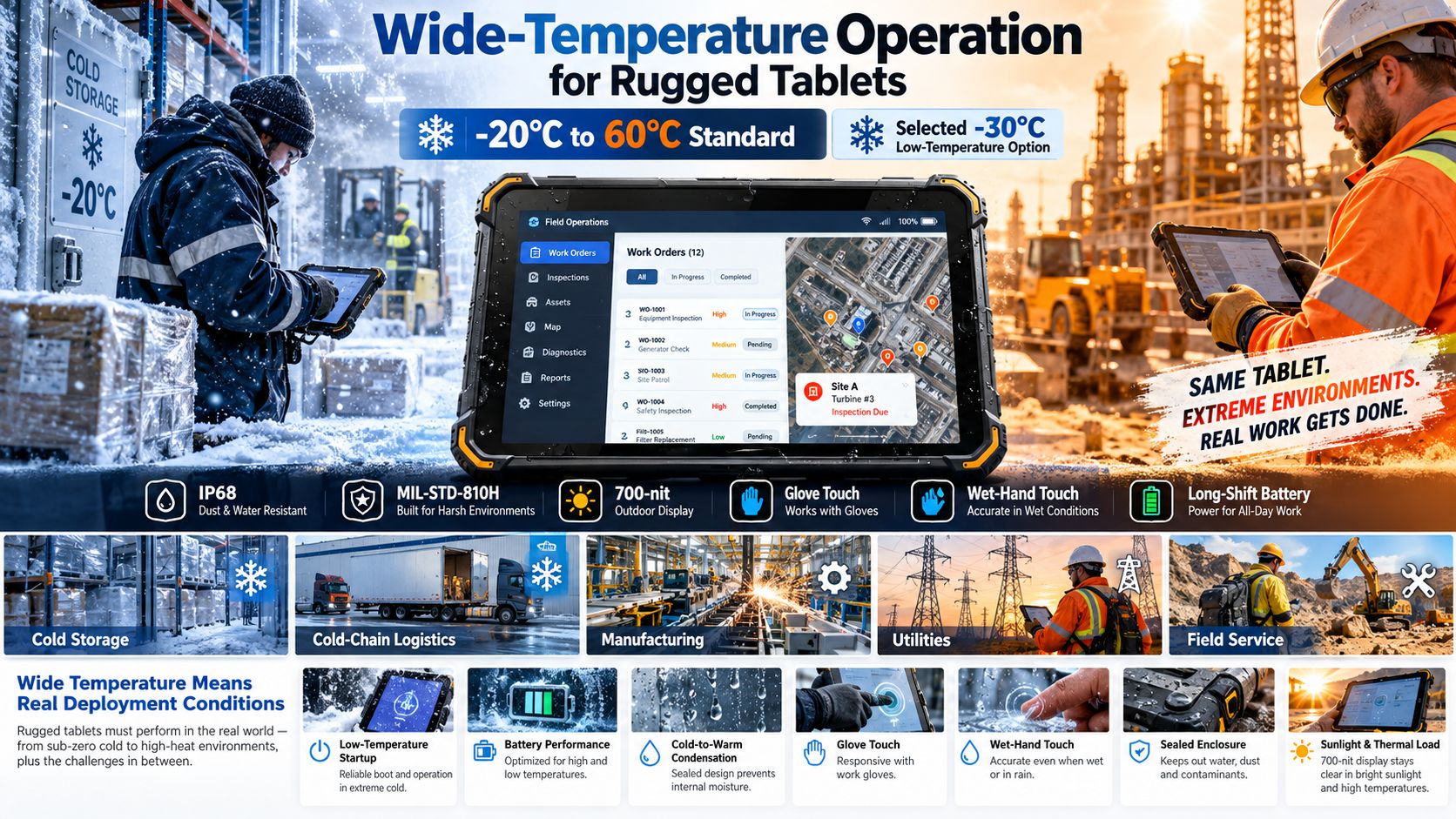
CENAVA Wide-Temperature Rugged Tablet Options
| Model | Screen | OS | Standard Operating Temperature | Low-Temperature Option | Protection |
|---|---|---|---|---|---|
| W10Y | 10.1" | Windows 11 | -20°C to 60°C | -30°C option | IP68 / MIL-STD-810H |
| W10N | 10.1" | Windows 10/11 | -20°C to 60°C | -30°C option | IP68 / MIL-STD-810H |
| W18Y | 10.1" | Windows 11 | -20°C to 60°C | -30°C option | IP68 / MIL-STD-810H |
| A10R | 10.1" | Android / Linux | -20°C to 60°C | -30°C option | IP68 / MIL-STD-810H |
| A10ST | 10.1" | Android | -20°C to 60°C | Selected -30°C configuration | IP68 / MIL-STD-810H |
| A80ST | 8" | Android | -20°C to 60°C | Project dependent | IP68 / MIL-STD-810H |
| A80PT | 8" | Android | -20°C to 60°C | -30°C option | IP68 / MIL-STD-810H |
| A88ST | 8" | Android | -20°C to 60°C | — | IP68 / MIL-STD-810H |
One warning before the table: temperature is a configuration, not a sticker. The same model can leave our line with different cells, displays and seals, and each combination behaves differently at the edge of the range. Tell us your real minimum and we quote against it.
Current W10Y, A10R, W10N and W18Y specifications all list -20°C to 60°C operation and selected -30°C customization.
What Does Wide-Temperature Operation Mean?
It means the tablet keeps running across a wider ambient range than an office device. It does not mean every part behaves the same at every degree. We rate two separate numbers, and mixing them up is the most common spec mistake we see:A tablet can survive -30°C in a parked truck overnight and still only boot at -20°C. Charging is a third number again: our standard packs charge down to -30°C. Ask for all three numbers before you sign off a freezer project.
-20°C to 60°C Rugged Tablets
This rating covers most industrial sites we ship into. W10Y pairs it with IP68 sealing and 1.22m drop tests under MIL-STD-810H. A10R runs the same range on Android or Linux. One caveat from the field: ambient is not device temperature. A tablet on a dashboard in July sun runs far hotter than the weather report says.
-30°C Low-Temperature Rugged Tablets
Some applications require operation below the standard -20°C range.
Below -20°C, standard versions stop and custom work starts. We currently build -30°C versions of W10Y, A10R, W18Y and A80PT. Treat -30°C as a whole configuration — cells, display response, seals all change — not a line you edit in the datasheet.
Wide-Temperature Tablets for Cold Storage
Cold stores are the harshest routine environment we design for. The tablet itself is half the problem; the worker walking between a -25°C freezer and a humid dock every ten minutes is the other half. Six things decide whether the device survives that routine:
Low-Temperature Startup
The tablet should be capable of powering on reliably within the specified temperature range.
Battery Performance
Lithium battery performance changes at low temperatures, so runtime may differ from room-temperature operation.
Condensation
Moving between cold and warm environments can cause condensation.
Wet-Hand Touch
Moisture on the screen may affect conventional touch panels.
Glove Touch
Cold-storage employees normally wear gloves.
Sealed Enclosure
Moisture, condensation and dust require appropriate enclosure protection.
We built the A80ST with exactly this routine in mind: -20°C to 60°C, glove touch, and an optional wet-hand mode for cold-chain condensation.
Glove Touch for Low-Temperature Work
Cold-weather work means gloves, and taking them off at -20°C gets old fast. We fit glove-compatible capacitive panels on W10Y, A10R, A80ST and other platforms. Bring your actual gloves to the pilot — a thin liner and a freezer mitt are different worlds. / Condensation is the quieter killer. Walk a tablet from a cold store into a warm humid dock and water forms on the glass; a standard capacitive panel reads that water as fingers. Our wet-hand option — offered on A80ST for cold-chain condensation, also on W10Y and A10R — keeps the panel predictable when it is wet.
Wet-Hand Touch and Condensation
Cold environments introduce another problem: condensation.
When a tablet moves from a cold warehouse into a warm, humid space, moisture can form on the screen.
A conventional capacitive touchscreen may interpret water as unintended input.
Selected CENAVA rugged tablet configurations support wet-hand touch to maintain more predictable touchscreen operation under moisture exposure.
For example, A80ST specifically lists wet-hand customization for cold-chain condensation, while W10Y and A10R also provide wet-hand touchscreen options.
High-Temperature Rugged Tablets
Heat is the harder end. Processors and batteries make their own heat, sunlight cooks the enclosure, and a parked vehicle in summer runs far hotter than the air outside. A 60°C rating has to cover all of that, not just a hot afternoon. / We handle it two ways. Lower-power platforms like the W10N go fanless — no fan pulling dust in, no moving part to wear out, and the sealed enclosure stays intact. Higher-power chips need more thermal headroom, and we will tell you straight if your workload does not fit a fanless build at 60°C ambient.
High-performance processors may require different thermal solutions depending on workload and ambient temperature.
Battery Performance at Low Temperatures
Battery behavior is an important part of wide-temperature computing.
Cold cuts runtime. A pack that lasts a shift at 25°C will not match it in a freezer, and no datasheet can argue with that physics — run the pilot in the real cold. / Charging is stricter than operating. The battery-management system limits or stops charge at low temperature even while the tablet keeps running. Get the charging answer early, because it kills more freezer projects than the operating range does. / For long shifts we offer three routes: 10,000mAh standard packs, 20,000mAh options on some models, and hot-swappable designs where backup power keeps the system alive during the swap. A80ST ships with 10,000mAh and takes a larger pack on custom orders.
Sunlight and High Temperature
Sun load hits twice: it heats the enclosure and forces the backlight up, which makes more heat. Our W10Y and A10R ship with 700-nit outdoor panels, and A10R takes a 1000-nit option for high-glare sites. Brightness, runtime and temperature trade against each other — tell us your two priorities and we balance the third.
- Ambient temperature
- Direct sunlight
- Battery runtime
- Thermal management
CENAVA platforms such as W10Y and A10R combine a standard 700-nit outdoor display with -20°C to 60°C wide-temperature operation; A10R can additionally be configured with a 1000-nit display for stronger glare environments.
Wide-Temperature Windows Rugged Tablets
The temperature rating does not care about the OS, but your software does. W10Y and W10N run Windows 11 across -20°C to 60°C with -30°C options. A10R covers Android and Linux (Ubuntu/Debian builds) on the same range, and A18ST adds a 10,000mAh pack for Android field apps. We check drivers and peripherals on your exact configuration as part of the pilot.
Wide-Temperature Tablets for Manufacturing
Manufacturing plants can contain both hot and cold operating zones.
Examples include:
- Refrigerated production
- Outdoor loading areas
- Hot machinery zones
- Unheated workshops
- Warehouses
Rugged tablets can be used for:
- MES
- Production reporting
- Quality inspection
- Maintenance
- Work instructions
- Equipment diagnostics
A wide-temperature platform helps one device operate across more areas of the facility.
Wide-Temperature Tablets for Cold-Chain Logistics
Cold-chain operations are one of the clearest applications for wide-temperature rugged tablets.
Workers may move between:
- Freezers
- Refrigerated warehouses
- Trucks
- Loading docks
- Outdoor areas
Important features include:
- Low-temperature operation
- Glove touch
- Wet-hand touch
- IP68 protection
- Barcode scanning
- Long battery life
- Wi-Fi / 4G / 5G
Compact 8-inch models can be particularly useful because warehouse workers need to carry the device continuously.
Wide-Temperature Tablets for Utilities
Utility technicians often work outdoors throughout the year.
A tablet may need to function during:
- Winter maintenance
- Summer heat
- Rain
- Strong sunlight
- Remote field operation
Useful capabilities include:
- Wide-temperature operation
- IP68
- High-brightness display
- GPS/GNSS
- 4G/5G
- Long battery life
- Glove touch
For infrastructure mapping or specialized field work, selected platforms can also support RTK positioning.
Cold chain and logistics. Freezers, docks, yards — workers carry the device all shift, so 8-inch models like A80ST and A80PT earn their keep here. Glove touch, wet-hand mode and a scan engine matter more than screen size.
Outdoor field work. Utility crews, construction sites, farms. The tablet sees a -20°C morning and a 40°C afternoon in the same week, plus dust and drops. RTK positioning is an option on some platforms for mapping and precision agriculture.
Vehicles and diagnostics. A mounted tablet lives in the worst microclimate there is — frozen before startup in winter, oven-hot after lunch in summer. W10Y and W10N wire into the vehicle with Ethernet, RS232 and dock charging. Mining and energy sites add one more rule: wide temperature is not explosion protection, and where gas or combustible dust is present our A10R-EX and A10ST-EX families carry the hazardous-area certifications.
8-Inch Wide-Temperature Tablets
Our 8-inch line — A80ST, A80PT, A80R, A88ST — suits workers who carry the tablet for a whole shift. A80PT runs -20°C to 60°C with a -30°C build option, stores at -30°C to 70°C, and takes a -40°C storage limit on request. A88ST matches the standard operating range. / Our 10-inch platforms — W10Y, W10N, W18Y, A10R, A10ST — all carry the standard range, and most take the -30°C option. Need a keyboard and a bigger screen in the same weather? The W14US rugged laptop is rated -20°C to 60°C operating and -30°C to 70°C storage, with IP65 and MIL-STD-810H.
10-Inch Wide-Temperature Tablets
10-inch rugged tablets provide more screen area for:
- Maps
- Windows applications
- Equipment diagnostics
- Work instructions
- Production dashboards
CENAVA W10Y, W10N, W18Y, A10R and A10ST platforms all provide -20°C to 60°C standard operating configurations.
Several also offer -30°C low-temperature customization.
Wide-Temperature Rugged Laptops
Wide-temperature capability is not limited to tablets.
CENAVA W14US rugged laptop is specified for -20°C to 60°C operation and -30°C to 70°C storage, together with IP65 and MIL-STD-810H protection.
This type of platform is better suited when technicians need:
- Integrated keyboard
- Large screen
- Multiple USB devices
- Dual Ethernet
- RS232
- Engineering software
Rugged laptops and tablets can therefore use similar environmental specifications while serving different workflows.
Wide Temperature Does Not Mean Explosion Proof
Four specs, four jobs. Wide temperature is the operating range. IP rating is dust and water. MIL-STD-810H covers drop, shock and vibration test methods. Explosion protection is for flammable atmospheres — and one never implies the others. For petrochemical or mining work, ask us for the ATEX or IECEx paperwork; we certify those separately. / A -20°C to 60°C rating is a stated range, not a promise of everything inside it. It does not mean unlimited hours at 60°C. It does not mean charging at every temperature, identical runtime at -20°C and 25°C, or full CPU speed at both ends. Past the edge of the range, all bets are off — tell us where your edge is and we rate against it.
Professional deployments should evaluate the entire operating cycle.
How to Choose a Wide-Temperature Rugged Tablet
1. Write down the real minimum. "Cold resistant" is not a spec — 0°C, -10°C, -20°C and -30°C are four different builds.
2. Write down the real maximum, including sun load and vehicle interiors, not just the weather.
3. Split operating from storage. A tablet sleeping in a truck overnight faces a different number than one running in your hands.
4. Say where charging happens. This line decides more freezer projects than any other.
5. Test runtime in the real cold, with your brightness and your radios on.
6. Name the gloves and expect condensation. Glove touch and wet-hand mode are options, not defaults.
7. Send us the full picture — tablet, battery, display, modules, charger, software, temperature — and we pilot the complete configuration before volume.
Why Choose CENAVA for Wide-Temperature Rugged Computing?
Standard -20°C to 60°C across our current tablet and laptop platforms
-30°C builds on W10Y, A10R, W18Y, A80PT and more
Windows, Android and Linux on the same thermal envelope
IP67/IP68 sealing plus MIL-STD-810H 1.22m drop testing
700-nit and 1000-nit outdoor displays, glove and wet-hand touch
OEM/ODM thermal work — we engineer the full package: cells, display, interfaces, OS, enclosure
Frequently Asked Questions About Wide-Temperature Operation
1. What is a wide-temperature rugged tablet?
A wide-temperature rugged tablet is an industrial tablet designed to operate across a broader ambient-temperature range than a typical office or consumer device.
Many CENAVA rugged platforms are specified for -20°C to 60°C operation.
2. Can a tablet operate at -20°C?
Selected industrial rugged tablets are specifically designed for operation down to -20°C.
CENAVA W10Y, W10N, A10R, A80ST and several other platforms currently list -20°C as their standard minimum operating temperature.
3. Does CENAVA offer tablets that operate at -30°C?
Selected models offer -30°C low-temperature customization.
Current examples include W10Y, A10R, W18Y and A80PT.
Tell us the model and we quote the exact low-temperature configuration.
4. Can rugged tablets operate at 60°C?
Selected CENAVA rugged tablets are specified for operation up to 60°C ambient temperature.
Actual application suitability still depends on workload, charging, direct sunlight and installation conditions.
5. What is the difference between operating and storage temperature?
Operating temperature applies while the device is powered and working.
Storage temperature applies while the device is powered off.
A wider storage range does not automatically mean the device can operate across that entire range.
6. Are wide-temperature tablets suitable for cold storage?
Yes, if the required cold-storage temperature falls within the specified configuration.
Also evaluate battery performance, glove touch, condensation and charging conditions.
7. Can rugged tablets be charged at -20°C?
Do not assume that the operating-temperature specification is also the charging-temperature specification.
Charging has its own limits — ask for the number on your exact battery.
8. Does battery life change in cold weather?
Battery performance can differ at low temperatures.
Test runtime in your real conditions — your temperature, your brightness, your radios — instead of trusting the room-temperature figure.
9. Is -20°C to 60°C enough for vehicle use?
It may be suitable for many vehicle applications, but parked vehicles exposed to extreme winter or summer conditions can experience temperatures beyond normal outdoor ambient conditions.
Evaluate both operating and storage conditions for the specific installation.
10. Which CENAVA wide-temperature tablet should I choose?
For Windows industrial software and full I/O, consider W10Y or W10N.
For Android/Linux and higher-performance industrial computing, consider A10R.
For compact cold-storage or logistics work, consider A80PT or A80ST.
For a slim Windows platform, consider W18Y.
Tell us your minimum temperature, charging setup, runtime target and interfaces — we point you at the right build.
Where Consumer Hardware Dies
Standard commercial electronics are specified for 0°C to 35°C ambient. Below freezing, LCD response times collapse and lithium batteries refuse to deliver current; above 50°C, throttling begins and component lifetime halves for every extra 10°C. Cold-chain logistics, desert deployments, steel mills and vehicle-mounted systems all live outside that window.
The Wide-Temperature Engineering Stack
- Industrial-grade components rated -40°C to +85°C at the silicon level
- Low-temperature LCDs with heating films or fast-response liquid formulations
- Battery packs with low-temperature cells and self-heating charge logic
- Thermal design — heat spreaders and fanless conduction paths instead of consumer heat pipes
- Certified testing — MIL-STD-810 Methods 501/502/503 (high temp, low temp, thermal shock)
Spec It Correctly
Check both operating and storage ranges: a device may survive -30°C storage but only boot at -20°C. For vehicle-mount use, add the solar-load margin — a dashboard device can see 70°C+ internal vehicle temps in summer. CENAVA rugged platforms are validated for -20°C to 60°C operation, with extended configurations available on request.
Need a Custom Rugged Solution?
Our engineering team can tailor rugged hardware to your exact environment, certifications and workflow. Tell us your requirements.
Talk to an Engineer All Technologies


